Advanced Features
Interactive Brushing
Hold Shift and drag on any chart to draw a selection rectangle.
All charts on the page sharing the same X values highlight matching
points and dim everything else.
from glyphx.layout import grid
from glyphx.series import ScatterSeries

f1 = Figure(); f1.add(ScatterSeries(x, y1, label="Sales"))
f2 = Figure(); f2.add(ScatterSeries(x, y2, label="Revenue"))

html = grid([f1, f2], rows=1, cols=2)
open("linked_dashboard.html", "w").write(html)
Shift+drag — draw the selectionEscape— clear the selection
Synchronized Crosshair
fig.enable_crosshair()
fig.share("report.html")
3-D Interactive Charts
Figure3D renders via Three.js WebGL with mouse orbit controls, tooltips,
and theme-aware axis grids. A static SVG is generated as a fallback for
environments where JavaScript is not available.
from glyphx import Figure3D
from glyphx.scatter3d import Scatter3DSeries
from glyphx.surface3d  import Surface3DSeries
from glyphx.line3d     import Line3DSeries
from glyphx.bar3d      import Bar3DSeries
from glyphx.contour    import ContourSeries
import numpy as np

# 3-D Scatter — fourth variable encoded as color
fig = Figure3D(title="Gaussian Mixture", theme="dark",
               azimuth=45, elevation=30)
fig.add(Scatter3DSeries(xs, ys, zs, c=zs, cmap="plasma",
                        size=4, label="Cluster A"))
fig.show()   # opens WebGL viewer; saves .html for sharing

# 3-D Surface — large grids are auto-decimated and face-culled
x = np.linspace(-3, 3, 150)
y = np.linspace(-3, 3, 150)
Z = np.sin(np.sqrt(x[None,:]**2 + y[:,None]**2))
fig = Figure3D(title="Sinc Surface")
fig.add(Surface3DSeries(x, y, Z, cmap="viridis", wireframe=True))
fig.show()

# 3-D Polyline
t = np.linspace(0, 4 * np.pi, 2_000)
fig = Figure3D(title="Helix")
fig.add(Line3DSeries(np.cos(t), np.sin(t), t / (4 * np.pi),
                     color="#dc2626", width=2.5))
fig.show()

# Contour lines over a grid
fig = Figure3D(title="Contour")
fig.add(ContourSeries(x, y, Z, levels=12, filled=True, cmap="coolwarm"))
fig.show()
All 3-D series accept a threshold keyword to override the default
downsampling budget; see Large-Data Downsampling for details.
New 2-D Chart Types (v1.5+)
Bubble Chart
Scatter plot with size encoding for a fourth variable:
from glyphx.bubble import BubbleSeries

fig = Figure()
fig.add(BubbleSeries(x, y, sizes=market_cap, c=growth_rate,
                     cmap="plasma", label="Companies"))
fig.show()
Sunburst Chart
Multi-ring hierarchical chart:
from glyphx.sunburst import SunburstSeries

fig = Figure(width=600, height=600)
fig.add(SunburstSeries(
    labels=["Total", "A", "A1", "A2", "B", "B1"],
    parents=["",     "Total","A","A","Total","B"],
    values= [0,       40,    25,  15,  60,    60],
))
fig.show()
Parallel Coordinates
High-dimensional data visualization:
from glyphx.parallel_coords import ParallelCoordinatesSeries

fig = Figure(width=900, height=500)
fig.add(ParallelCoordinatesSeries(
    data=df[["sepal_length","sepal_width","petal_length","petal_width"]],
    labels=df["species"],
    cmap="viridis",
))
fig.show()
Diverging Bar Chart
Horizontal bars diverging from a center baseline:
from glyphx.diverging_bar import DivergingBarSeries

fig = Figure()
fig.add(DivergingBarSeries(
    categories=["Q1","Q2","Q3","Q4"],
    values=    [  2,  -3,   5,  -1],
    color_pos="#2563eb",
    color_neg="#dc2626",
))
fig.show()
Statistical Charts
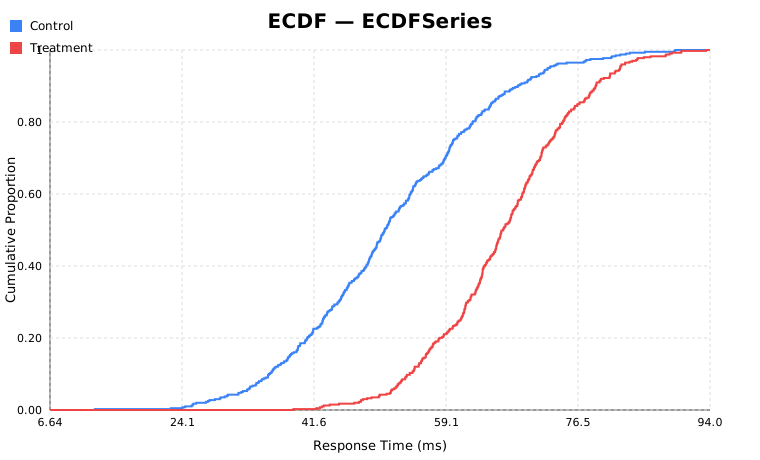
ECDF
from glyphx.ecdf import ECDFSeries

fig = (
    Figure()
    .set_title("Response Time Distribution")
    .add(ECDFSeries(control_data,   label="Control",   color="#3b82f6"))
    .add(ECDFSeries(treatment_data, label="Treatment", color="#ef4444"))
)
fig.show()
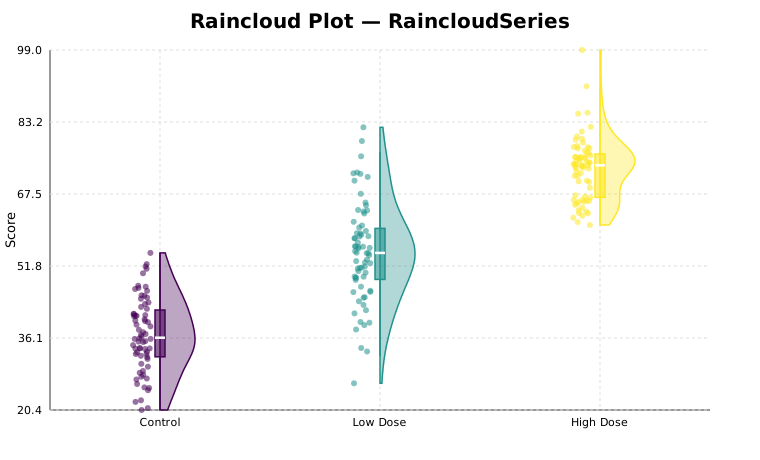
Raincloud Plot
Combines jittered strip plot, half-violin, and box in one panel.
Use seed= for reproducible jitter:
from glyphx.raincloud import RaincloudSeries

fig = Figure()
fig.add(RaincloudSeries(
    data=[control, low_dose, high_dose],
    categories=["Control", "Low Dose", "High Dose"],
    violin_width=35,
    seed=42,   # reproducible jitter
))
fig.show()
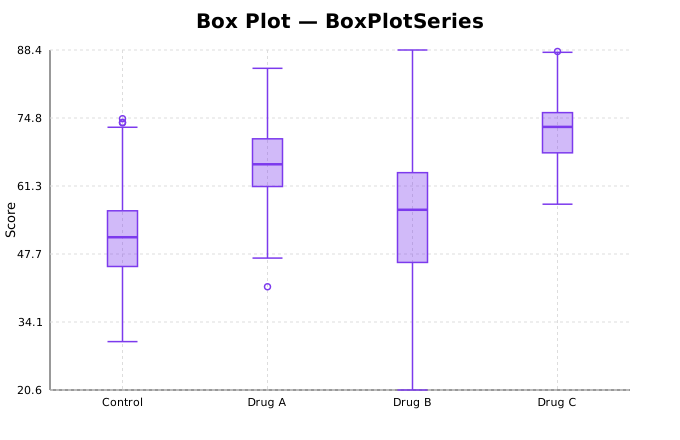
Box Plot
from glyphx.series import BoxPlotSeries

fig = Figure()
fig.add(BoxPlotSeries(
    [control, drug_a, drug_b, drug_c],
    categories=["Control","Drug A","Drug B","Drug C"],
    box_width=30,
))
fig.show()
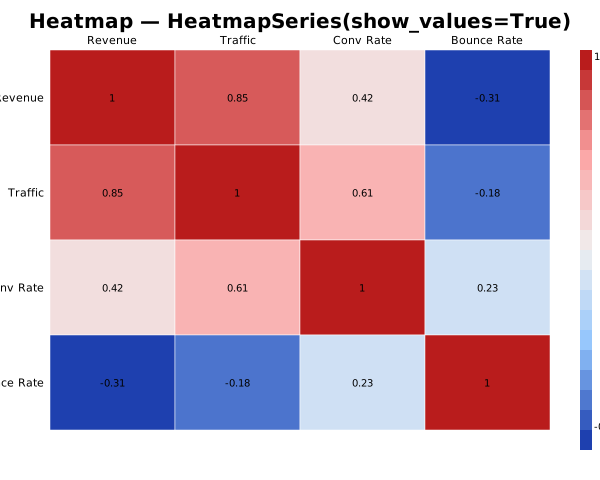
Heatmap
from glyphx.series import HeatmapSeries

fig = Figure()
fig.add(HeatmapSeries(
    corr_matrix,
    row_labels=labels,
    col_labels=labels,
    show_values=True,
))
fig.show()
Financial Charts
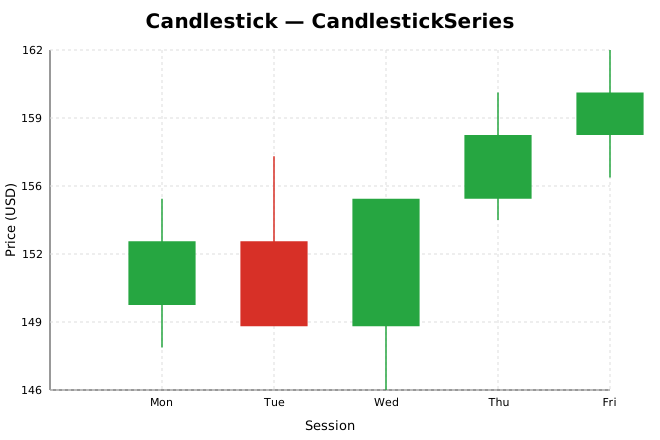
Candlestick / OHLC
from glyphx.candlestick import CandlestickSeries

fig = Figure().set_title("AAPL — Daily OHLC")
fig.add(CandlestickSeries(
    dates=["Mon","Tue","Wed","Thu","Fri"],
    open= [150, 153, 149, 155, 158],
    high= [155, 157, 153, 160, 162],
    low=  [148, 151, 146, 154, 156],
    close=[153, 149, 155, 158, 160],
))
fig.show()
Waterfall / Bridge Chart
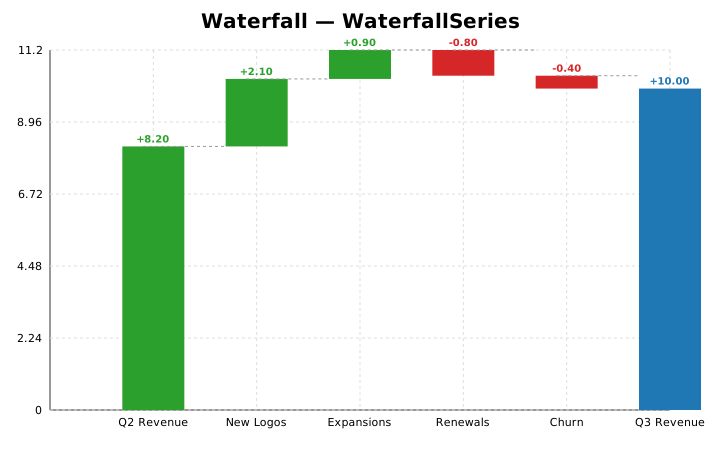
from glyphx.waterfall import WaterfallSeries

fig = Figure().set_title("Q3 Revenue Bridge ($M)")
fig.add(WaterfallSeries(
    labels=["Q2 Revenue","New Logos","Expansions","Churn","Discounts","Q3 Revenue"],
    values=[8.2, 2.1, 0.9, -0.8, -0.4, None],
    show_values=True,
))
fig.show()
Hierarchical Charts
Treemap
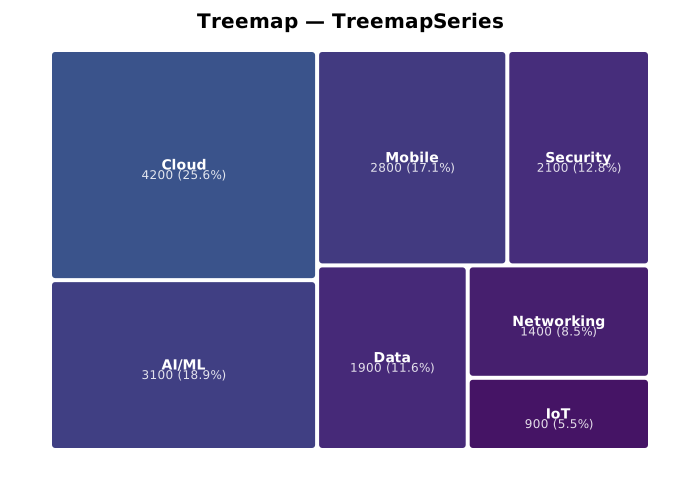
from glyphx.treemap import TreemapSeries

fig = Figure(width=700, height=500)
fig.add(TreemapSeries(
    labels=["Cloud","AI/ML","Mobile","Security","Data","Networking","IoT"],
    values=[4200, 3100, 2800, 2100, 1900, 1400, 900],
    cmap="viridis",
    show_values=True,
))
fig.show()
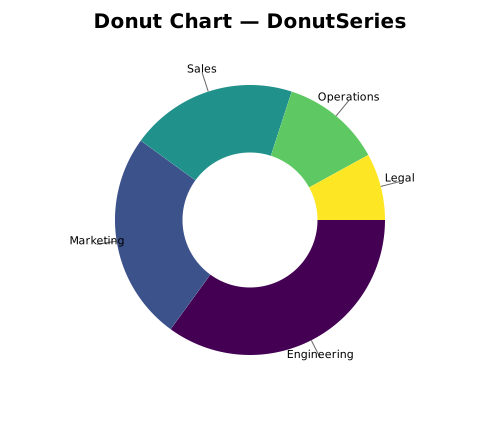
Pie and Donut Charts
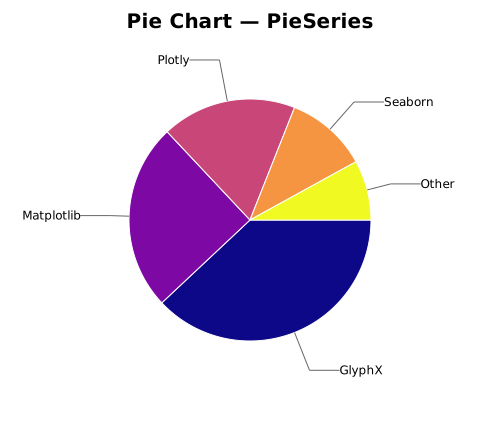
from glyphx.series import PieSeries, DonutSeries
from glyphx.colormaps import colormap_colors

fig = Figure(width=500, height=440)
fig.add(PieSeries([38,25,18,11,8],
    labels=["GlyphX","Matplotlib","Plotly","Seaborn","Other"],
    colors=colormap_colors("plasma", 5)))
fig.show()
Streaming / Real-Time
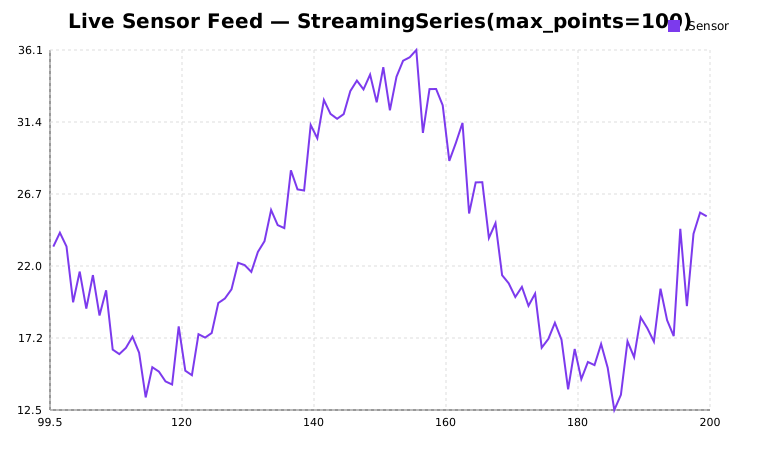
from glyphx.streaming import StreamingSeries

fig = Figure().set_title("Live Sensor Feed")
stream = StreamingSeries(max_points=100, color="#7c3aed", label="Sensor")
fig.add(stream)

# Push values one at a time
stream.push(42.0)

# Jupyter live mode — no server required
with stream.live(fig, fps=10) as s:
    for reading in sensor_generator():
        s.push(reading)
Accessibility
Every chart meets WCAG 2.1 AA standards:
role="img"andaria-labelledbyon the root<svg>element<title>and<desc>with auto-generated descriptionstabindex="0"androle="graphics-symbol"on every data pointTab/Arrowkey navigation between data pointsEnter/Spaceto show tooltips from keyboardEscapeto dismiss
alt = fig.to_alt_text()
# 'Line chart titled "Monthly Revenue". X axis: Month. Y axis: USD.
#  Series "Revenue": 12 data points. Ranges from 98 (Mar) to 300 (Dec).'
PPTX Export
Requires pip install "glyphx[pptx]" and the system libcairo library.
fig.save("chart.pptx")
Note
On macOS: brew install cairo.
On Ubuntu/Debian: sudo apt-get install libcairo2.
Violin Plots
Pure-NumPy KDE — no scipy required:
from glyphx.violin_plot import ViolinPlotSeries

fig = Figure()
fig.add(ViolinPlotSeries(
    data=[group_a, group_b, group_c],
    show_median=True,
    show_box=True,
))
fig.show()
Seaborn-Style Composite Plots
from glyphx import pairplot, jointplot, lmplot, facet_plot

pairplot(df)
jointplot(df, x="a", y="b")
lmplot(df, x="x", y="y")
facet_plot(df, x="value", col="group", kind="hist")
Large-Data Performance
See Large-Data Downsampling for a full description of the automatic downsampling
pipeline, per-series threshold overrides, the global kill-switch, and the
last_downsample_info metadata API.
Quick reference:
# Per-series threshold
from glyphx.series import LineSeries
ls = LineSeries(x, y, threshold=1_000)   # keep at most 1 000 points

# Global kill-switch (thread-local)
import glyphx.downsample as ds
ds.disable()   # no downsampling on this thread
# ... render ...
ds.enable()

# Inspect what happened after render
print(ls.last_downsample_info)
# {'algorithm': 'M4+LTTB', 'original_n': 200000, 'thinned_n': 1000}