Advanced Features
Interactive Brushing
Hold Shift and drag on any chart to draw a selection rectangle.
All charts on the page sharing the same X values highlight matching
points and dim everything else.
from glyphx.layout import grid
from glyphx.series import ScatterSeries

f1 = Figure(); f1.add(ScatterSeries(x, y1, label="Sales"))
f2 = Figure(); f2.add(ScatterSeries(x, y2, label="Revenue"))

html = grid([f1, f2], rows=1, cols=2)
open("linked_dashboard.html", "w").write(html)
Shift+drag — draw the selectionEscape— clear the selection
A readout appears with the count, mean, sum and range of what is selected, updating live as the rectangle grows rather than only once you let go. Non-numeric values are skipped, so a categorical axis still reports a count. The readout is an ARIA live region, so the numbers are announced rather than being visual-only.
Selection Events
Clicking a point dispatches a glyphx:select event on document, so
anything on the page can react. Clicking the same point again, or pressing
Escape, dispatches glyphx:deselect.
fig.add(ScatterSeries(x, y, meta=[
    {"customer": "Acme", "region": "North"},
    {"customer": "Belltown", "region": "South"},
]))
document.addEventListener('glyphx:select', (e) => {
    console.log(e.detail.x, e.detail.y, e.detail.meta.customer);
});
meta is whatever was passed in Python, parsed back from JSON, so the
listener receives the structure that was written rather than a flattened
string. detail.data carries every data- attribute the element has,
so a listener gets whatever that chart type knows about the thing clicked –
percent on a pie, q1/q2/q3 on a box plot,
open/high/low/close on a candlestick.
Detail Panel
For the common case – click a point, show its record – there is no need to write a listener at all:
fig.add(ScatterSeries(x, y, meta=records))
fig.add_detail_panel(["customer", "region", "tier"], title="Selected")
fig.share("chart.html")
The panel renders beside the chart, fills in on click, and returns to its
empty message on Escape or a second click. fields fixes the display
order and omits anything else; leave it out to show whatever each point
carries.
It is an ordinary listener on the same glyphx:select event, so it
composes rather than competes – your own listeners still fire for the same
click, and cross-filtering still applies. Values render as text, never
markup.
Filter Controls
Checkboxes, radio buttons and a search box that filter the chart in the browser, with no server and no callbacks:
fig.add(ScatterSeries(x, y, meta=records))
fig.add_controls(checkboxes="region", radio="tier", search="customer",
                 title="Filter")
You name a field; GlyphX reads the distinct values out of the data and
builds one control per value. A field is found wherever it lives – in a
point’s meta, in its own data- attributes, or as the series label via
"series".
Filters combine with AND, which is how a stack of controls reads: tick two regions and type a name and you get that name within those regions. A running “Showing 12 of 40” sits underneath and is announced to screen readers.
Note
Checkboxes start ticked and radio groups get an “All” option. A panel that hides the data on load looks broken, and a radio group without “All” is a one-way trip.
Zoom, Pan and Touch
Scroll to zoom, drag to pan, double-click empty space to reset. Axis labels are redrawn for whatever region is visible, so a zoomed chart still shows its scale rather than losing the numbers along with the rest of the drawing. Linear axes only; a log axis keeps its original ticks.
On a touch device, one finger pans and two pinch to zoom, anchored on the midpoint between them.
A Reset view button appears in the toolbar as soon as the view moves and disappears once it is back to the default, so the way out is visible exactly when it is wanted. It restores zoom, position and axis labels together, across every chart on the page.
Synchronized Crosshair
fig.enable_crosshair()
fig.share("report.html")
3-D Interactive Charts
Figure3D renders via Three.js WebGL with mouse orbit controls, surface
value probe, click-to-select scatter, camera presets, auto-rotate, and
screenshot-to-PNG. A static SVG is generated as a fallback for environments
where JavaScript is not available. See Examples for a full gallery
with live interactive HTML files.
Series types
Class |
Description |
|---|---|
|
Scatter points; |
|
Regular |
|
Connected 3-D polyline; |
|
Vertical bars on a 2-D |
|
Filled contour lines on a 2-D regular grid (marching squares). |
Quick-start
from glyphx import Figure3D, plot3d
from glyphx.scatter3d import Scatter3DSeries
from glyphx.surface3d import Surface3DSeries
from glyphx.line3d    import Line3DSeries
from glyphx.bar3d     import Bar3DSeries
from glyphx.contour   import ContourSeries
import numpy as np

# Scatter -- fourth variable as colour
rng = np.random.default_rng(42)
xs, ys = rng.normal(0, 1, 400), rng.normal(0, 1, 400)
zs = np.sin(xs) + np.cos(ys)

fig = Figure3D(title="Scatter", theme="dark")
fig.scatter(xs, ys, zs, c=zs, cmap="plasma", size=5, label="Points")
fig.show()                  # interactive WebGL
fig.save("scatter3d.html")  # self-contained HTML

# Surface (method chaining)
x = np.linspace(-3, 3, 60)
y = np.linspace(-3, 3, 60)
X, Y = np.meshgrid(x, y)
Z = np.sin(np.sqrt(X**2 + Y**2))

(Figure3D(title="Sinc Surface", theme="dark")
 .surface(x, y, Z, cmap="viridis", wireframe=True)
 .show())

# Line -- parametric helix
t = np.linspace(0, 6 * np.pi, 2_000)
(Figure3D(title="Helix")
 .line3d(np.cos(t), np.sin(t), t / (2 * np.pi),
         color="#7c3aed", width=2.5)
 .show())

# Bar
heights = np.abs(np.random.randn(5, 5)) * 3 + 1
(Figure3D(title="3D Bars")
 .bar3d(np.arange(1, 6), np.arange(1, 6), heights, cmap="viridis")
 .show())

# Contour (2-D grid, regular Figure)
fig = Figure3D(title="Contour")
fig.add(ContourSeries(x, y, Z, levels=12, filled=True, cmap="coolwarm"))
fig.show()

# One-liner shorthand
plot3d(xs, ys, zs, kind="scatter", title="Quick Scatter")
plot3d(x,  y,  Z,  kind="surface", title="Quick Surface")
Overlay multiple series
Any Figure3D accepts multiple .add() or shorthand calls:
import numpy as np
from glyphx import Figure3D

x = np.linspace(-2, 2, 30)
y = np.linspace(-2, 2, 30)
X, Y = np.meshgrid(x, y)
Z_fit = X**2 + Y**2

obs_x = np.random.uniform(-2, 2, 80)
obs_y = np.random.uniform(-2, 2, 80)
obs_z = obs_x**2 + obs_y**2 + np.random.randn(80) * 0.3

(Figure3D(title="Model vs Observations", theme="dark")
 .surface(x, y, Z_fit, cmap="viridis", alpha=0.55)
 .scatter(obs_x, obs_y, obs_z, color="#f87171", size=5, label="Data")
 .show())
Figure3D constructor parameters
Parameter |
Default |
Description |
|---|---|---|
|
|
Canvas width in pixels |
|
|
Canvas height in pixels |
|
|
Chart title displayed top-centre |
|
|
Theme name; all seven 2-D themes work in 3-D |
|
|
Initial camera azimuth in degrees |
|
|
Initial camera elevation in degrees |
|
|
X-axis label |
|
|
Y-axis label |
|
|
Z-axis label |
Downsampling
All 3-D series auto-downsample before SVG generation. Pass
threshold=N to override the default budget of 5 000 points/faces
per series. After rendering, series.last_downsample_info reports
the algorithm used and the before/after counts. See Large-Data Downsampling
for full details.
New 2-D Chart Types (v1.5+)
Bubble Chart
Scatter plot with size encoding for a fourth variable:
from glyphx.bubble import BubbleSeries

fig = Figure()
fig.add(BubbleSeries(x, y, sizes=market_cap, c=growth_rate,
                     cmap="plasma", label="Companies"))
fig.show()
Sunburst Chart
Multi-ring hierarchical chart:
from glyphx.sunburst import SunburstSeries

fig = Figure(width=600, height=600)
fig.add(SunburstSeries(
    labels=["Total", "A", "A1", "A2", "B", "B1"],
    parents=["",     "Total","A","A","Total","B"],
    values= [0,       40,    25,  15,  60,    60],
))
fig.show()
Parallel Coordinates
High-dimensional data visualization:
from glyphx.parallel_coords import ParallelCoordinatesSeries

fig = Figure(width=900, height=500)
fig.add(ParallelCoordinatesSeries(
    data=df[["sepal_length","sepal_width","petal_length","petal_width"]],
    labels=df["species"],
    cmap="viridis",
))
fig.show()
Diverging Bar Chart
Horizontal bars diverging from a center baseline:
from glyphx.diverging_bar import DivergingBarSeries

fig = Figure()
fig.add(DivergingBarSeries(
    categories=["Q1","Q2","Q3","Q4"],
    values=    [  2,  -3,   5,  -1],
    color_pos="#2563eb",
    color_neg="#dc2626",
))
fig.show()
Statistical Charts
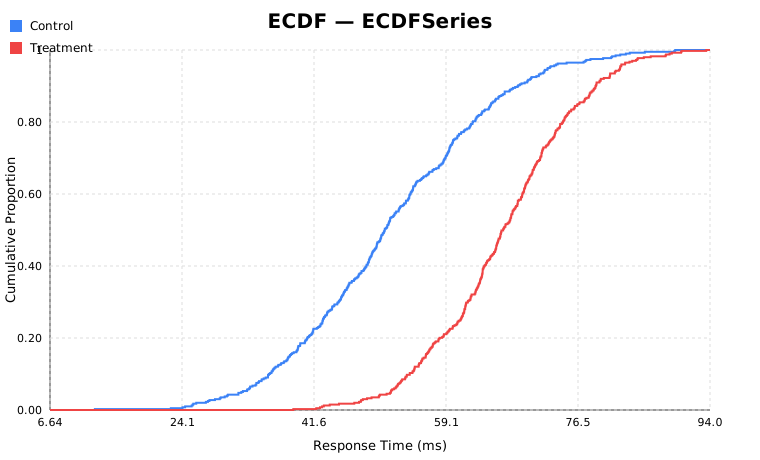
ECDF
from glyphx.ecdf import ECDFSeries

fig = (
    Figure()
    .set_title("Response Time Distribution")
    .add(ECDFSeries(control_data,   label="Control",   color="#3b82f6"))
    .add(ECDFSeries(treatment_data, label="Treatment", color="#ef4444"))
)
fig.show()
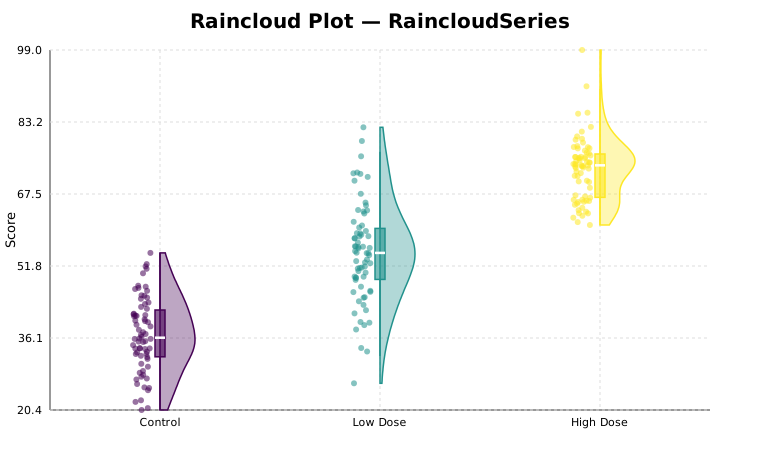
Raincloud Plot
Combines jittered strip plot, half-violin, and box in one panel.
Use seed= for reproducible jitter:
from glyphx.raincloud import RaincloudSeries

fig = Figure()
fig.add(RaincloudSeries(
    data=[control, low_dose, high_dose],
    categories=["Control", "Low Dose", "High Dose"],
    violin_width=35,
    seed=42,   # reproducible jitter
))
fig.show()
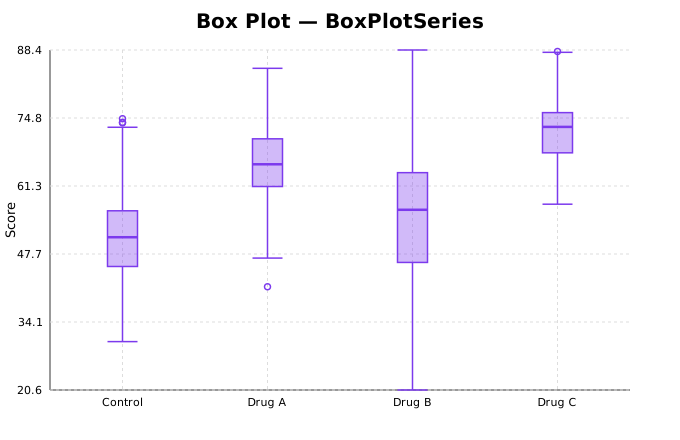
Box Plot
from glyphx.series import BoxPlotSeries

fig = Figure()
fig.add(BoxPlotSeries(
    [control, drug_a, drug_b, drug_c],
    categories=["Control","Drug A","Drug B","Drug C"],
    box_width=30,
))
fig.show()
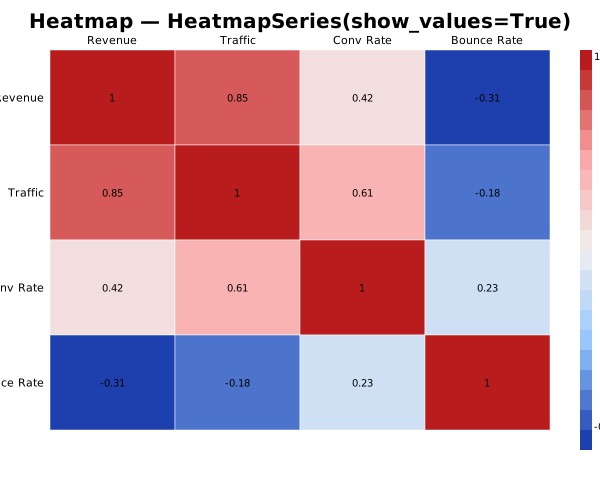
Heatmap
from glyphx.series import HeatmapSeries

fig = Figure()
fig.add(HeatmapSeries(
    corr_matrix,
    row_labels=labels,
    col_labels=labels,
    show_values=True,
))
fig.show()
Financial Charts
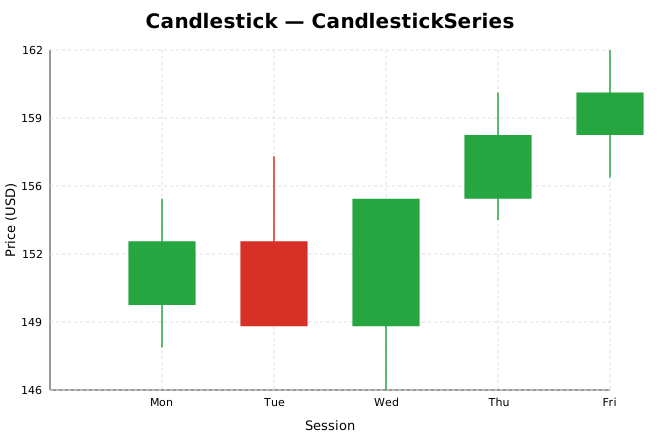
Candlestick / OHLC
from glyphx.candlestick import CandlestickSeries

fig = Figure().set_title("AAPL — Daily OHLC")
fig.add(CandlestickSeries(
    dates=["Mon","Tue","Wed","Thu","Fri"],
    open= [150, 153, 149, 155, 158],
    high= [155, 157, 153, 160, 162],
    low=  [148, 151, 146, 154, 156],
    close=[153, 149, 155, 158, 160],
))
fig.show()
Waterfall / Bridge Chart
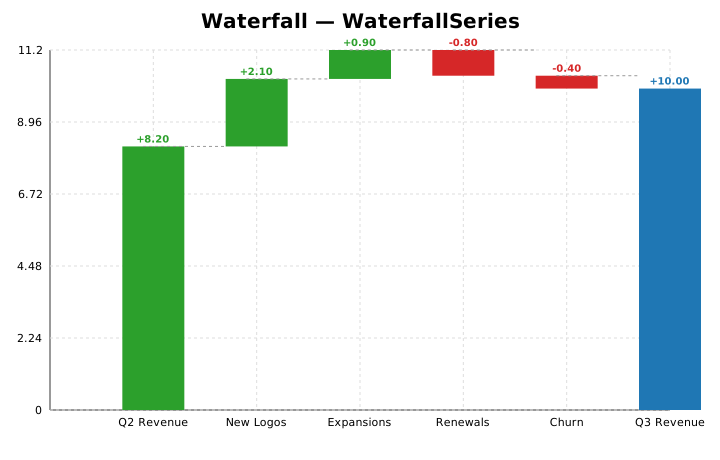
from glyphx.waterfall import WaterfallSeries

fig = Figure().set_title("Q3 Revenue Bridge ($M)")
fig.add(WaterfallSeries(
    labels=["Q2 Revenue","New Logos","Expansions","Churn","Discounts","Q3 Revenue"],
    values=[8.2, 2.1, 0.9, -0.8, -0.4, None],
    show_values=True,
))
fig.show()
Hierarchical Charts
Treemap
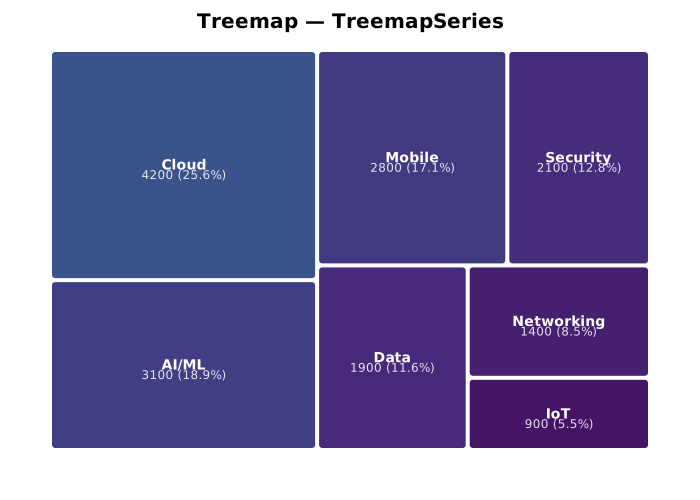
from glyphx.treemap import TreemapSeries

fig = Figure(width=700, height=500)
fig.add(TreemapSeries(
    labels=["Cloud","AI/ML","Mobile","Security","Data","Networking","IoT"],
    values=[4200, 3100, 2800, 2100, 1900, 1400, 900],
    cmap="viridis",
    show_values=True,
))
fig.show()
Pie and Donut Charts
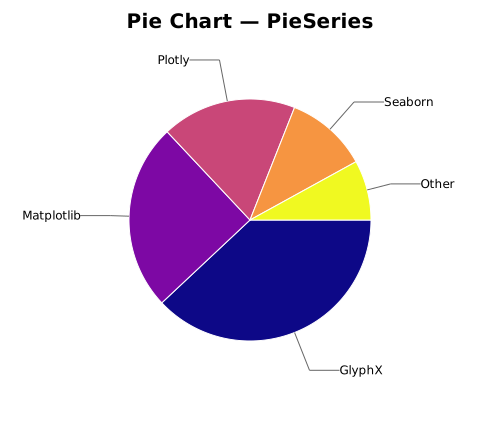
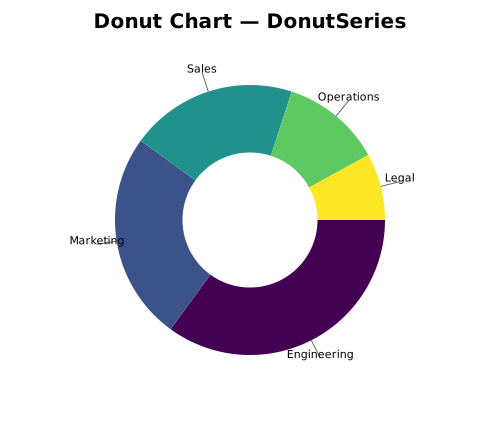
from glyphx.series import PieSeries, DonutSeries
from glyphx.colormaps import colormap_colors

fig = Figure(width=500, height=440)
fig.add(PieSeries([38,25,18,11,8],
    labels=["GlyphX","Matplotlib","Plotly","Seaborn","Other"],
    colors=colormap_colors("plasma", 5)))
fig.show()
Streaming / Real-Time
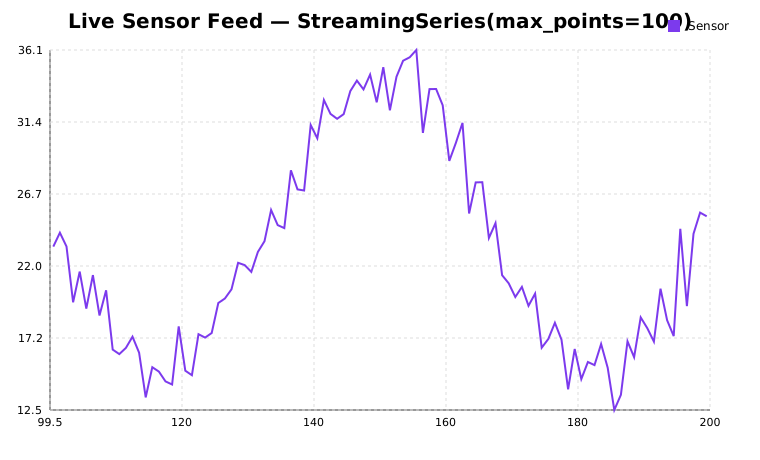
from glyphx.streaming import StreamingSeries

fig = Figure().set_title("Live Sensor Feed")
stream = StreamingSeries(max_points=100, color="#7c3aed", label="Sensor")
fig.add(stream)

# Push values one at a time
stream.push(42.0)

# Jupyter live mode — no server required
with stream.live(fig, fps=10) as s:
    for reading in sensor_generator():
        s.push(reading)
Accessibility
Every chart meets WCAG 2.1 AA standards:
role="img"andaria-labelledbyon the root<svg>element<title>and<desc>with auto-generated descriptionstabindex="0"androle="graphics-symbol"on every data pointTab/Arrowkey navigation between data pointsEnter/Spaceto show tooltips from keyboardEscapeto dismiss
alt = fig.to_alt_text()
# 'Line chart titled "Monthly Revenue". X axis: Month. Y axis: USD.
#  Series "Revenue": 12 data points. Ranges from 98 (Mar) to 300 (Dec).'
PPTX Export
Requires pip install "glyphx[pptx]" and the system libcairo library.
fig.save("chart.pptx")
Note
On macOS: brew install cairo.
On Ubuntu/Debian: sudo apt-get install libcairo2.
Violin Plots
Pure-NumPy KDE — no scipy required:
from glyphx.violin_plot import ViolinPlotSeries

fig = Figure()
fig.add(ViolinPlotSeries(
    data=[group_a, group_b, group_c],
    show_median=True,
    show_box=True,
))
fig.show()
Seaborn-Style Composite Plots
from glyphx import pairplot, jointplot, lmplot, facet_plot

pairplot(df)
jointplot(df, x="a", y="b")
lmplot(df, x="x", y="y")
facet_plot(df, x="value", col="group", kind="hist")
Large-Data Performance
See Large-Data Downsampling for a full description of the automatic downsampling
pipeline, per-series threshold overrides, the global kill-switch, and the
last_downsample_info metadata API.
Quick reference:
# Per-series threshold
from glyphx.series import LineSeries
ls = LineSeries(x, y, threshold=1_000)   # keep at most 1 000 points

# Global kill-switch (thread-local)
import glyphx.downsample as ds
ds.disable()   # no downsampling on this thread
# ... render ...
ds.enable()

# Inspect what happened after render
print(ls.last_downsample_info)
# {'algorithm': 'M4+LTTB', 'original_n': 200000, 'thinned_n': 1000}