Customization
Themes
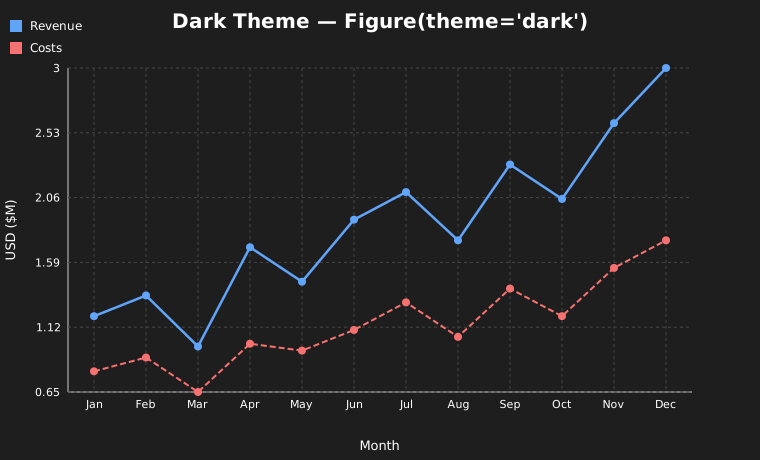
GlyphX ships seven built-in themes. Pass the name as a string:
from glyphx import Figure

Figure(theme="dark")
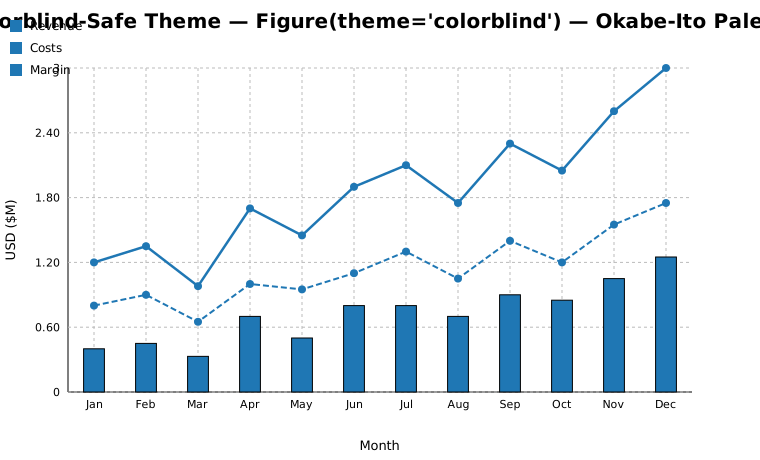
Figure(theme="colorblind")   # Okabe-Ito palette — safe for all types
Figure(theme="warm")
Figure(theme="ocean")
Figure(theme="pastel")
Figure(theme="monochrome")
Figure(theme="default")      # clean white (default)
Registering a custom theme
Figure accepts a theme dict directly, but every other entry point –
df.glyphx.*, facet_plot(), clustermap(),
Figure3D and the CLI – takes a theme name.
register_theme() adds a name to the registry so a custom
palette works in all of them:
from glyphx import Figure, register_theme, list_themes

register_theme(
    "acme",
    base="dark",                                # inherit the rest
    colors=["#e6194b", "#3cb44b", "#4363d8"],
    font="Inter, sans-serif",
)

Figure(theme="acme").line(x, y).show()
list_themes()        # ['acme', 'colorblind', 'dark', 'default', ...]
Unspecified keys are inherited from base, so a brand palette on top of the
dark theme is three lines. Definitions are validated on registration: unknown
keys, a non-list colors, and empty palettes all raise ValueError
with a message naming the problem.
Built-in names cannot be overwritten. Use unregister_theme() to
drop a custom one.
Note
An unrecognised theme name raises ValueError with a suggestion.
Earlier versions fell back to "default" silently, so a typo such as
theme="darkk" produced a light chart with no indication of the mistake.
Name |
Background |
Color Palette |
|---|---|---|
|
White |
Tableau-style |
|
Charcoal (#1e1e1e) |
Muted blues and ambers |
|
White |
Okabe-Ito — safe for deuteranopia, protanopia, tritanopia |
|
Off-white (#f9f9f9) |
Soft muted tones |
|
Cream (#fff8f0) |
Earthy reds and greens, Georgia serif font |
|
Light blue (#f0f8ff) |
Deep blues and teals |
|
White |
Greys only — print-safe |
Note
The colorblind theme uses the Okabe-Ito palette, the scientific standard for
colorblind-accessible data visualization. Earlier versions used grayscale
incorrectly — this was fixed in v1.5.0.
Custom Themes
Pass a dict with any subset of theme keys:
my_theme = {
    "colors":      ["#ff6b6b", "#4ecdc4", "#45b7d1", "#96ceb4"],
    "background":  "#1a1a2e",
    "text_color":  "#eeeeee",
    "axis_color":  "#555",
    "grid_color":  "#333",
    "font":        "Roboto, sans-serif",
}

Figure(theme=my_theme)
Colors and Line Styles
Pass color and linestyle directly to any series:
from glyphx.series import LineSeries

LineSeries(x, y, color="#16a34a", linestyle="solid",    width=2.5)
LineSeries(x, y, color="#2563eb", linestyle="dashed",   width=2.5)
LineSeries(x, y, color="#dc2626", linestyle="dotted",   width=2.5)
LineSeries(x, y, color="#d97706", linestyle="longdash", width=2.5)
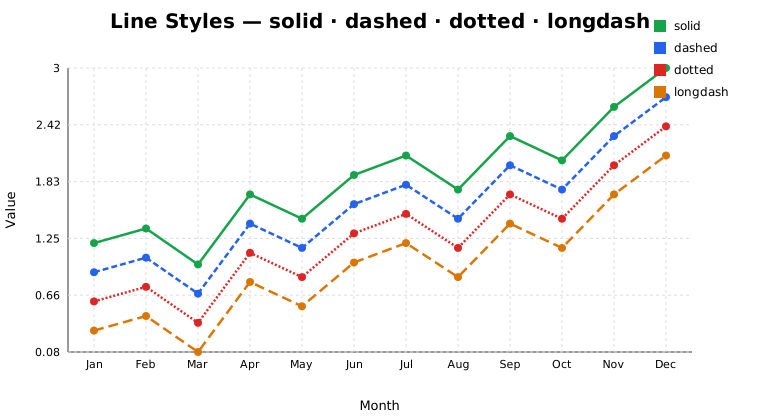
Available linestyle values: "solid", "dashed", "dotted", "longdash"
Colormaps
Nine perceptually-uniform colormaps are built in:
Name |
Type |
Best for |
|---|---|---|
|
Sequential |
Default continuous encoding |
|
Sequential |
High-contrast continuous data |
|
Sequential |
Print-safe on dark backgrounds |
|
Sequential |
Heatmaps and density plots |
|
Sequential |
Deuteranopia-safe alternative to viridis |
|
Diverging |
Correlation matrices, positive/negative |
|
Diverging |
Two-sided data centered at zero |
|
Multi-hue |
Categorical ranges (use sparingly) |
|
Sequential |
Monochrome / print output |
from glyphx.colormaps import apply_colormap, colormap_colors, list_colormaps
from glyphx.series import ScatterSeries

# Single value → hex color
color = apply_colormap(0.75, "plasma")

# N evenly-spaced colors
colors = colormap_colors("viridis", 6)

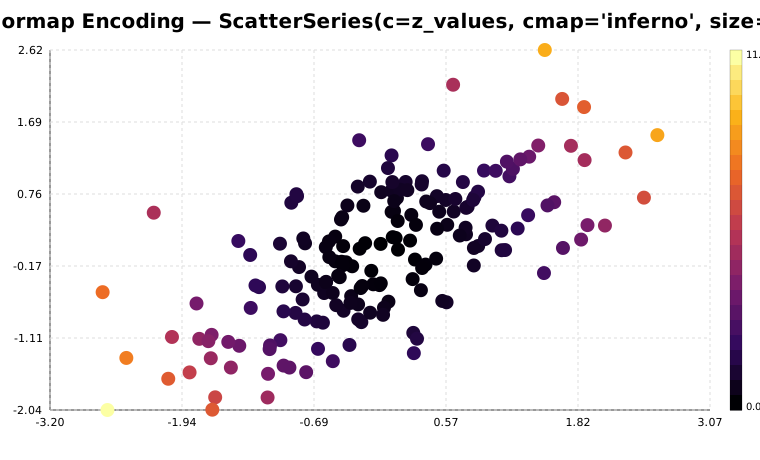
# Color-encode scatter points by a third variable
ScatterSeries(x, y, c=z_values, cmap="plasma", size=8)
Annotations
Add text callouts in data-space coordinates:
fig.annotate(
    "Record High",
    x=11, y=2.9,
    arrow=True,
    color="#dc2626",
    font_size=12,
)
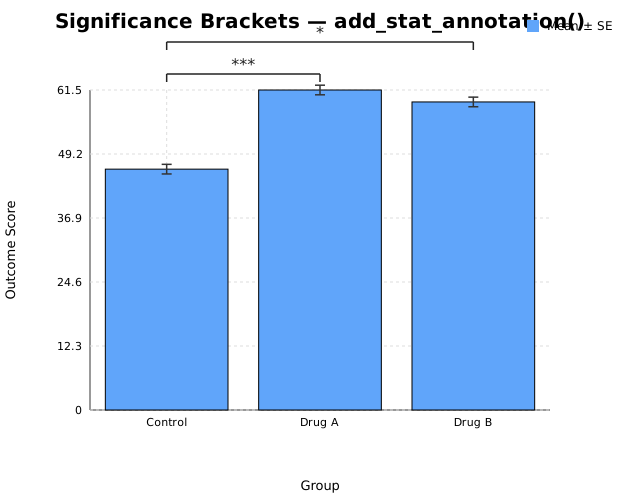
Statistical Significance Brackets
fig = (
    Figure()
    .add(BarSeries(["Control","Drug A","Drug B"], means, yerr=errors))
    .add_stat_annotation("Control", "Drug A", p_value=0.0003)
    .add_stat_annotation("Control", "Drug B", p_value=0.031, y_offset=30)
)
Grid Layouts
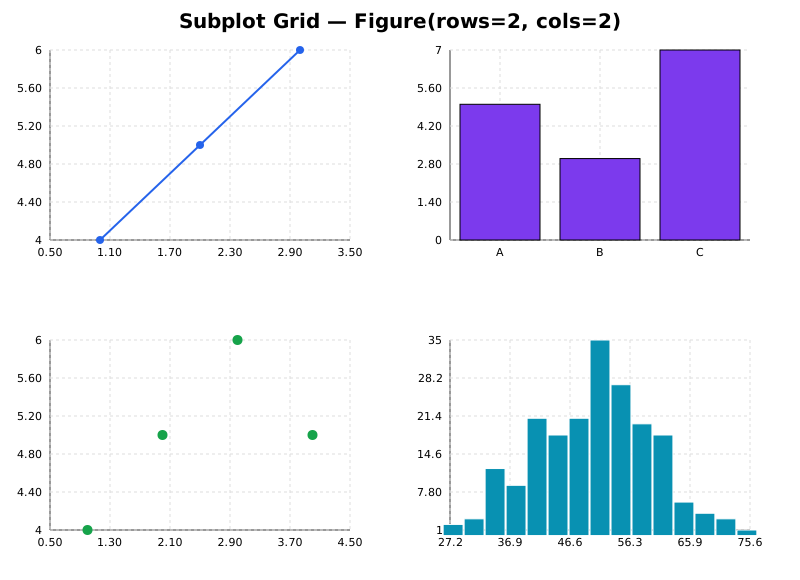
Subplot grid on a single Figure:
fig = Figure(rows=2, cols=2, width=1000, height=700)
fig.add_axes(0, 0).add_series(LineSeries([1,2,3], [4,5,6]))
fig.add_axes(0, 1).add_series(BarSeries(["A","B","C"], [5,3,7]))
fig.add_axes(1, 0).add_series(ScatterSeries([1,2,3], [4,5,6]))
fig.add_axes(1, 1).add_series(HistogramSeries(data, bins=15))
fig.show()
Multiple Figures on one HTML page:
from glyphx.layout import grid

html = grid([f1, f2, f3], rows=1, cols=3)
open("dashboard.html", "w").write(html)
Tight Layout
fig = (
    Figure()
    .add(BarSeries(long_category_names, values))
    .tight_layout()
)