Getting Started
Installation
Install the core library:
pip install glyphx
Install optional extras depending on what you need:
pip install "glyphx[pptx]"    # PowerPoint export (python-pptx + cairosvg)
pip install "glyphx[export]"  # PNG / JPG raster export (resvg-py + pillow)
pip install "glyphx[cairo]"   # alternative PDF backend (cairosvg)
pip install "glyphx[all]"     # Everything
SVG, HTML and PDF need nothing beyond the base install. PDF is written by a
pure-Python backend, so it works in a bare virtualenv; the cairo extra is
only an alternative renderer.
Note
PNG/JPG export needs no system libraries – resvg-py ships prebuilt
wheels. The cairo and pptx extras do require the system
libcairo library. On macOS: brew install cairo.
On Ubuntu/Debian: sudo apt-get install libcairo2.
Install from source:
git clone https://github.com/kjkoeller/glyphx.git
cd glyphx
pip install -e .
Your First Chart
The quickest path is the plot() function:
from glyphx import plot

plot([1, 2, 3, 4, 5], [3, 5, 2, 8, 7], kind="line", title="Simple Line Chart")
This automatically renders in your Jupyter notebook, opens a browser tab in CLI,
or displays in your IDE’s HTML viewer — with no .show() call required.
The Three APIs
GlyphX offers three entry points depending on your workflow:
1. ``plot()`` — one-liner
Best for quick exploration and scripts:
from glyphx import plot

plot(x=["A","B","C"], y=[10, 25, 15], kind="bar", title="Sales by Region")
plot(data=raw_values, kind="hist", bins=20)
plot(data=[30, 40, 30], kind="pie", labels=["X","Y","Z"])
2. Figure + method chaining — full control
Best for production charts and dashboards:
from glyphx import Figure
from glyphx.series import LineSeries, BarSeries

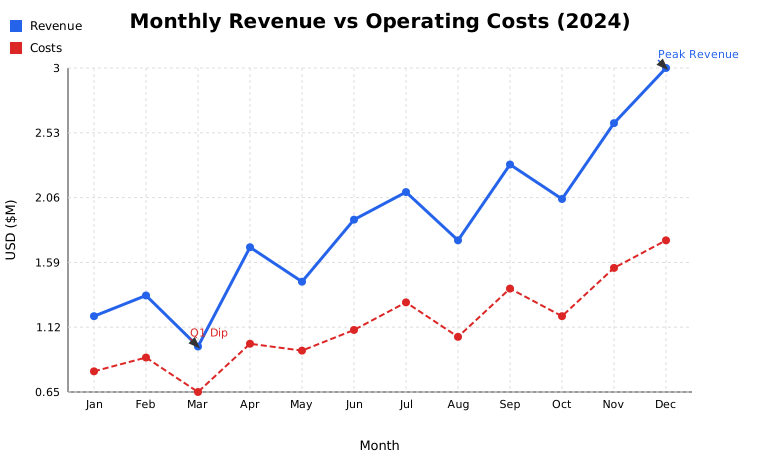
fig = (
    Figure(width=800, height=500, theme="dark")
    .set_title("Revenue vs Costs")
    .set_xlabel("Month")
    .set_ylabel("USD (thousands)")
    .add(LineSeries(months, revenue, color="#60a5fa", label="Revenue"))
    .add(LineSeries(months, costs, color="#f87171", label="Costs", linestyle="dashed"))
    .set_legend("top-left")
    .tight_layout()
)

fig.show()                        # Jupyter / browser
fig.save("chart.svg")             # SVG file
fig.save("chart.html")            # Interactive HTML
fig.share("report.html")          # Self-contained, zero-CDN HTML
3. DataFrame accessor — pandas-native
Import glyphx once and every DataFrame gains a .glyphx namespace.
The hue= parameter splits any chart by a categorical column, producing
one series per group with automatically assigned theme colors:
import pandas as pd
import glyphx  # registers the accessor

df = pd.read_csv("sales.csv")

df.glyphx.line(x="date", y="revenue", title="Daily Revenue")
df.glyphx.bar(x="product", y="units", title="Units by Product")
df.glyphx.scatter(x="spend", y="conversions")

# Hue splitting — one BarSeries per region, auto-colored
df.glyphx.bar(x="month", y="revenue", hue="region", title="Revenue by Region")

# Full chain from the accessor
(df.glyphx
   .bar(x="month", y="revenue", auto_display=False)
   .set_theme("dark")
   .add_stat_annotation("Jan", "Jun", p_value=0.002)
   .share("monthly_report.html"))
4. Figure3D — interactive 3-D charts
Three.js WebGL renderer with mouse orbit controls; SVG orthographic fallback:
from glyphx import Figure3D, plot3d
from glyphx.scatter3d import Scatter3DSeries
from glyphx.surface3d  import Surface3DSeries
from glyphx.line3d     import Line3DSeries
from glyphx.bar3d      import Bar3DSeries
import numpy as np

# 3-D scatter with colormap encoding
fig = Figure3D(title="3D Scatter", theme="dark", azimuth=45, elevation=30)
fig.add(Scatter3DSeries(xs, ys, zs, c=zs, cmap="plasma", size=4))
fig.show()   # opens interactive Three.js viewer

# 3-D surface — z = f(x, y)
x = np.linspace(-3, 3, 60)
y = np.linspace(-3, 3, 60)
Z = np.sin(np.sqrt(x[None,:]**2 + y[:,None]**2))
fig = Figure3D(title="Surface")
fig.add(Surface3DSeries(x, y, Z, cmap="viridis", wireframe=True))
fig.show()

# One-liner 3-D
plot3d(xs, ys, zs, kind="scatter", title="Quick 3D")
Available Chart Types
Kind / Class |
Description |
|---|---|
|
Line chart with error bars, linestyles, and step mode |
|
Bar chart with error bars and hue grouping |
|
Scatter plot with continuous color encoding ( |
|
Frequency distribution histogram |
|
Box-and-whisker; single or multi-group |
|
Pie chart with callout labels |
|
Donut chart |
|
2-D matrix heatmap with colorbar |
|
Empirical CDF step function |
|
Jitter + half-violin + box combined; reproducible with |
|
KDE violin plot (pure NumPy, no scipy) |
|
Smooth kernel-density curve |
|
Shaded area / confidence band |
|
OHLC financial candles |
|
Cumulative bridge / waterfall chart |
|
Squarified treemap |
|
Sliding-window real-time chart |
|
Side-by-side grouped bars |
|
Scatter with size encoding for a fourth variable |
|
Multi-ring hierarchical chart |
|
High-dimensional parallel axes |
|
Horizontal diverging bars centered at zero |
|
Jittered strip plot |
|
Count of categorical values |
|
3-D scatter with colormap and size encoding |
|
3-D surface |
|
3-D connected polyline |
|
3-D bar chart |
|
Contour lines / filled contours over a grid |