Examples
Basic Charts
Line Chart — Multi-Series with Annotations
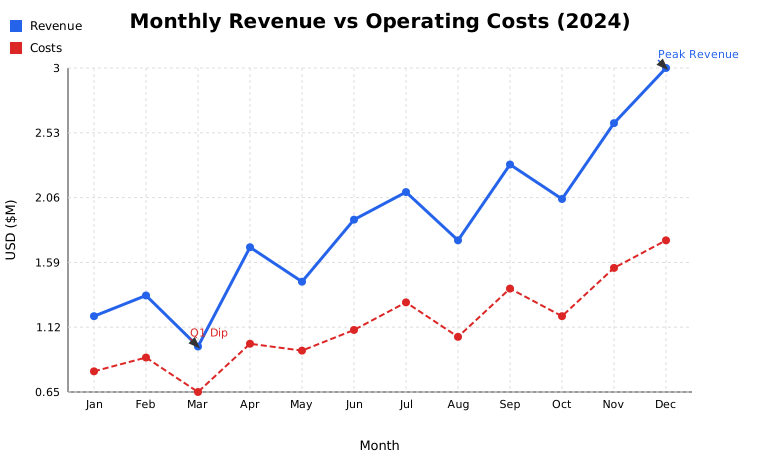
fig = (
    Figure(width=760, height=460)
    .set_title("Monthly Revenue vs Operating Costs  (2024)")
    .set_xlabel("Month").set_ylabel("USD ($M)")
    .add(LineSeries(months, revenue, color="#2563eb", label="Revenue", width=3))
    .add(LineSeries(months, costs,   color="#dc2626", label="Costs",   linestyle="dashed"))
    .set_legend("top-left")
    .annotate("Peak Revenue", x="Dec", y=3.00, arrow=True, color="#2563eb")
    .tight_layout()
)
fig.show()
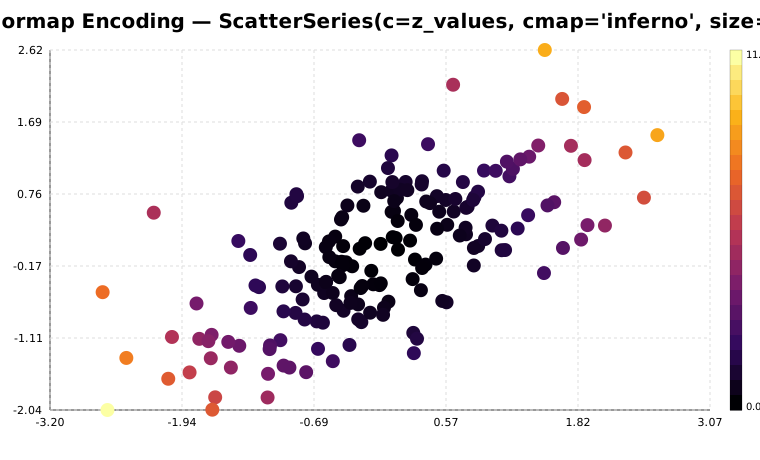
Scatter with Colormap Encoding
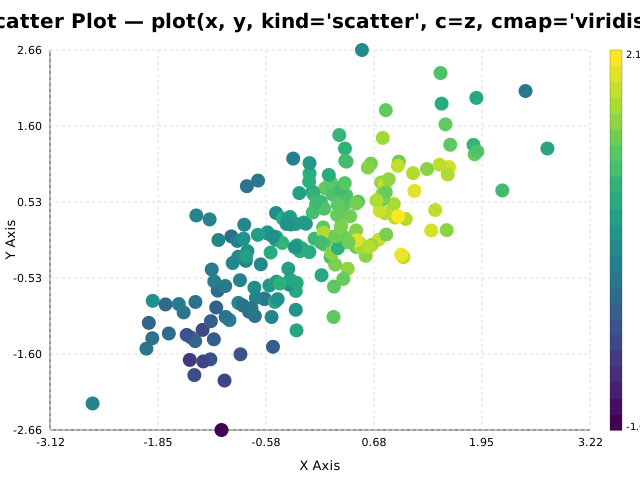
ScatterSeries(x, y, c=z_values, cmap="viridis", size=7)
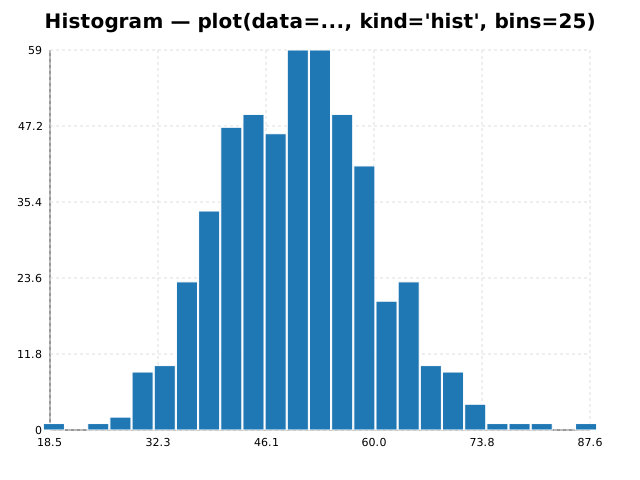
Histogram — Bimodal Distribution
import numpy as np
data = np.concatenate([np.random.normal(50,8,400), np.random.normal(78,6,200)])
Figure().add(HistogramSeries(data.tolist(), bins=28, color="#0891b2")).show()
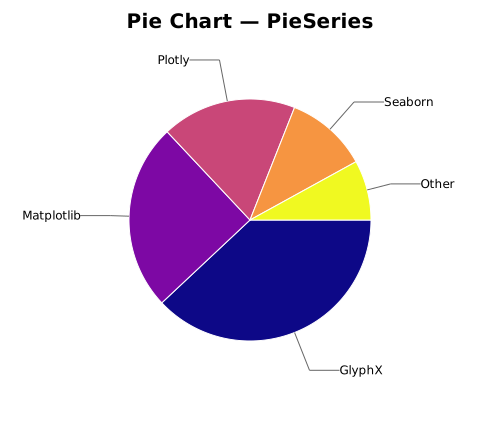
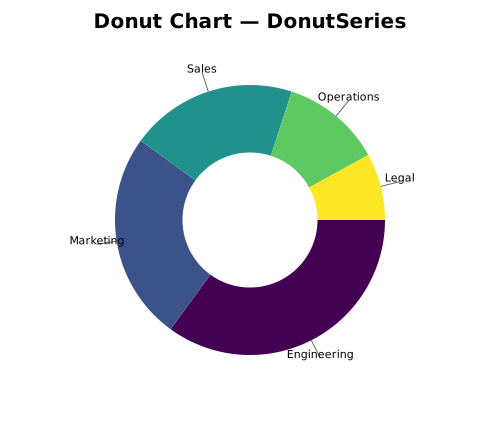
Pie and Donut Charts
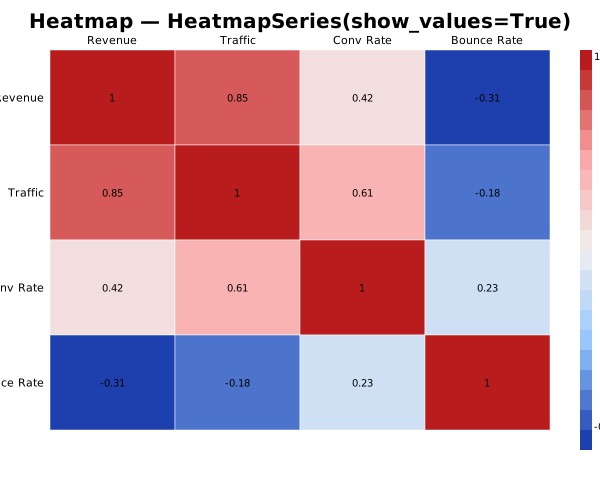
Heatmap — Correlation Matrix
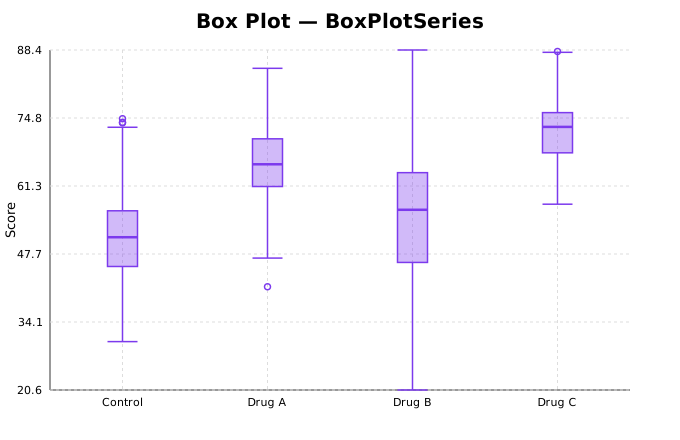
Box Plot — Multi-Group
New 2-D Chart Types
Bubble Chart
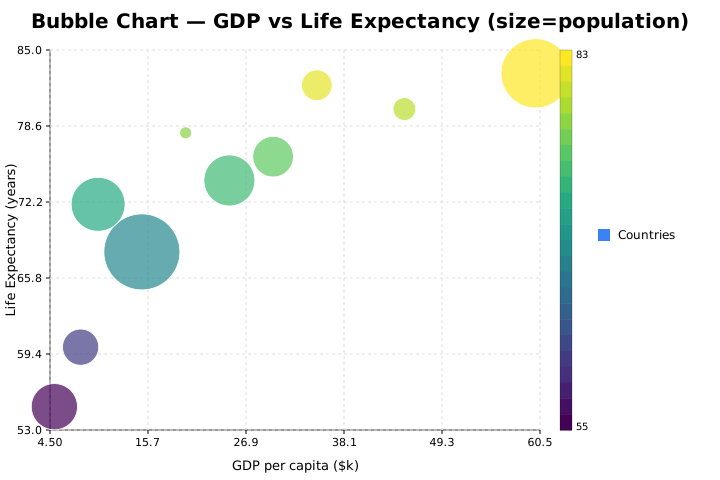
from glyphx.bubble import BubbleSeries

fig = Figure().set_title("Market Cap vs Growth Rate")
fig.add(BubbleSeries(x, y, sizes=market_cap, c=growth_rate,
                     cmap="plasma", label="Companies"))
fig.show()
Sunburst Chart
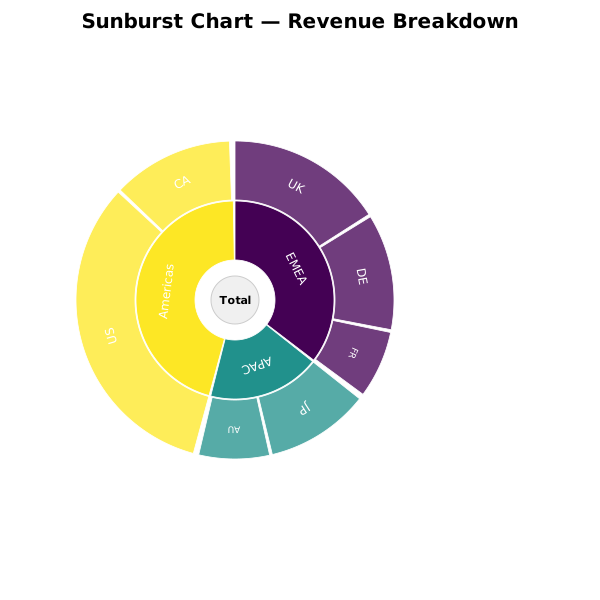
from glyphx.sunburst import SunburstSeries

fig = Figure(width=600, height=600).set_title("Org Revenue Breakdown")
fig.add(SunburstSeries(
    labels=["Total", "EMEA", "APAC", "Americas",
            "UK", "DE", "JP", "AU", "US", "CA"],
    parents=["",     "Total","Total","Total",
             "EMEA","EMEA","APAC","APAC","Americas","Americas"],
    values= [0,      0,      0,      0,
             420,    310,    280,    190,   850,       320],
))
fig.show()
Parallel Coordinates
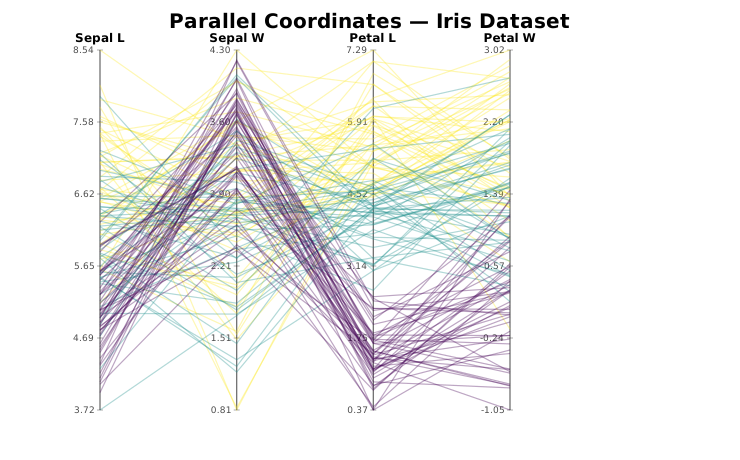
from glyphx.parallel_coords import ParallelCoordinatesSeries

fig = Figure(width=900, height=500).set_title("Iris Dataset")
fig.add(ParallelCoordinatesSeries(
    data=df[["sepal_length","sepal_width","petal_length","petal_width"]],
    labels=df["species"],
    cmap="viridis",
))
fig.show()
Diverging Bar Chart
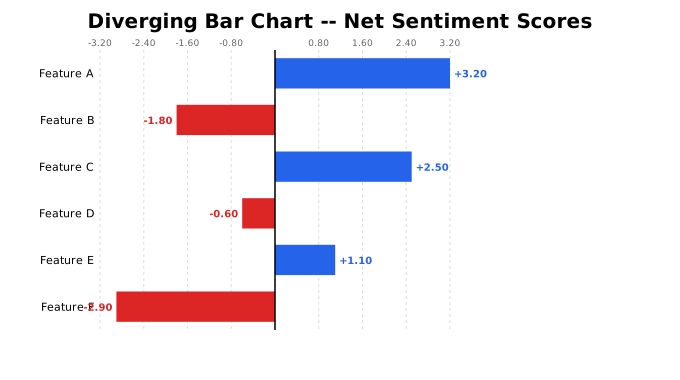
from glyphx.diverging_bar import DivergingBarSeries

fig = Figure().set_title("YoY Growth by Region")
fig.add(DivergingBarSeries(
    categories=["North","South","East","West","Central"],
    values=    [  12,    -8,     21,    -3,      15],
    pos_color="#2563eb",
    neg_color="#dc2626",
))
fig.show()
3-D Charts
Figure3D renders via Three.js WebGL with full mouse, touch, and keyboard
controls. Every chart also produces a static SVG fallback for environments
where JavaScript is unavailable. Live interactive HTML outputs from these
examples are in docs/examples/11_3d_*.html.
3-D Scatter
Scatter points with continuous colour encoding on a fourth variable (c=).
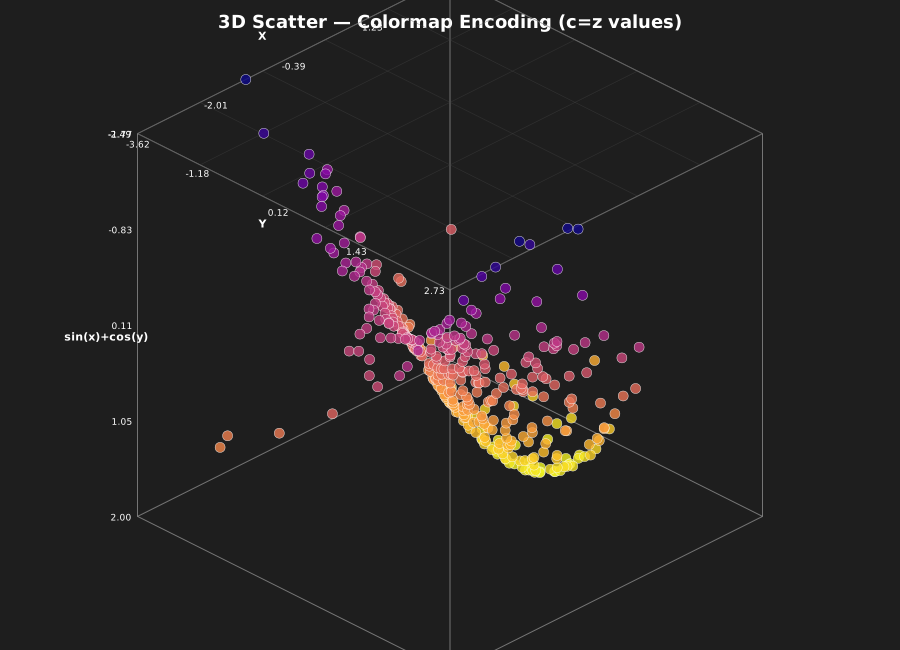
from glyphx import Figure3D
from glyphx.scatter3d import Scatter3DSeries
import numpy as np

rng = np.random.default_rng(42)
xs  = rng.normal(0, 1, 400)
ys  = rng.normal(0, 1, 400)
zs  = np.sin(xs) + np.cos(ys)

fig = Figure3D(title="3D Scatter -- Colormap Encoding", theme="dark",
               azimuth=45, elevation=25)
fig.scatter(xs, ys, zs,
            c=zs,          # colour each point by its Z value
            cmap="plasma",
            size=5, alpha=0.80,
            label="sin(x)+cos(y)")
fig.show()
fig.save("scatter3d.html")  # self-contained interactive HTML
Multiple labelled series – click the legend to toggle each one:
fig = Figure3D(title="3D Scatter -- Multiple Series")
for label, color, dx in [("Group A", "#2563eb",  0),
                          ("Group B", "#dc2626",  2),
                          ("Group C", "#16a34a", -2)]:
    xs = np.random.randn(80) + dx
    fig.scatter(xs, np.random.randn(80), np.random.randn(80),
                color=color, size=5, label=label)
fig.show()
3-D Surface
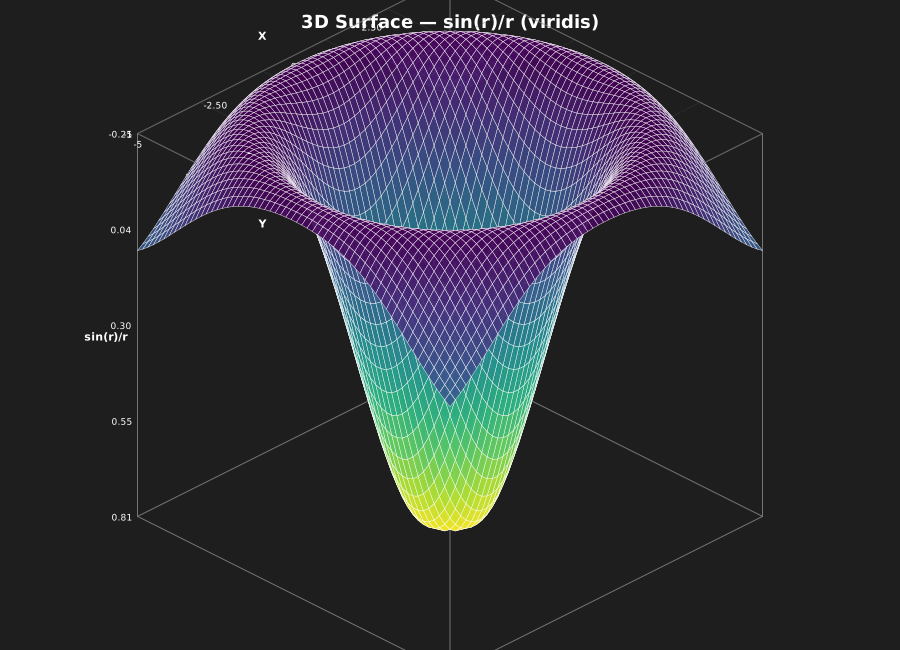
Regular z = f(x, y) grids with optional wireframe overlay. Large grids
are automatically decimated and sub-pixel faces culled before rendering.
from glyphx import Figure3D
from glyphx.surface3d import Surface3DSeries
import numpy as np

# sinc surface  z = sin(r) / r
x = np.linspace(-5, 5, 60)
y = np.linspace(-5, 5, 60)
X, Y = np.meshgrid(x, y)
Z = np.sin(np.sqrt(X**2 + Y**2)) / (np.sqrt(X**2 + Y**2) + 0.1)

fig = Figure3D(title="sin(r)/r Surface", theme="dark")
fig.surface(x, y, Z, cmap="viridis", alpha=0.92, wireframe=True)
fig.show()
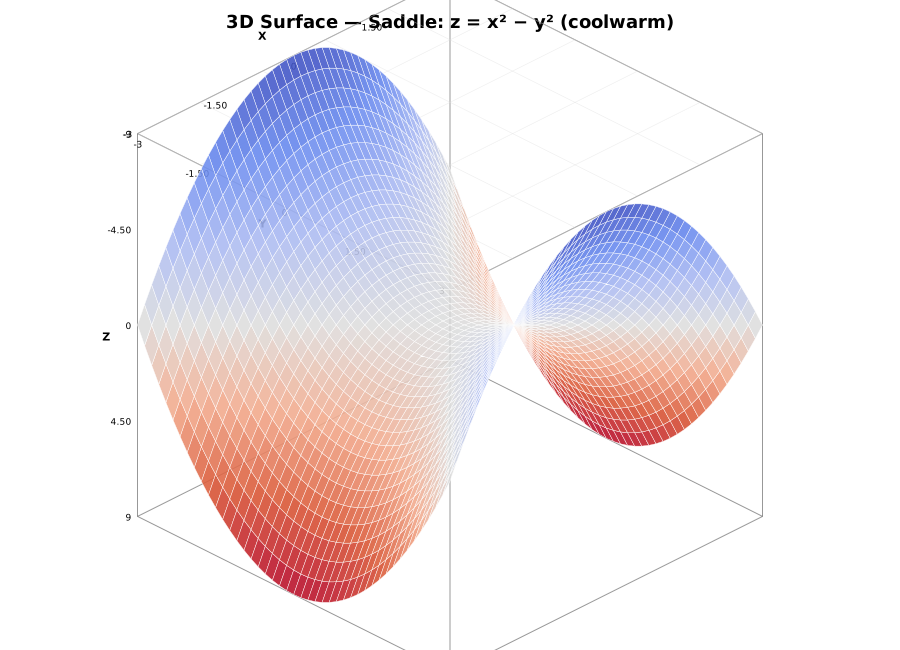
# Saddle  z = x^2 - y^2
x = np.linspace(-3, 3, 45)
y = np.linspace(-3, 3, 45)
X, Y = np.meshgrid(x, y)
Z = X**2 - Y**2

fig = Figure3D(title="Saddle: z = x2 - y2")
fig.surface(x, y, Z, cmap="coolwarm", alpha=0.88)
fig.show()
3-D Line
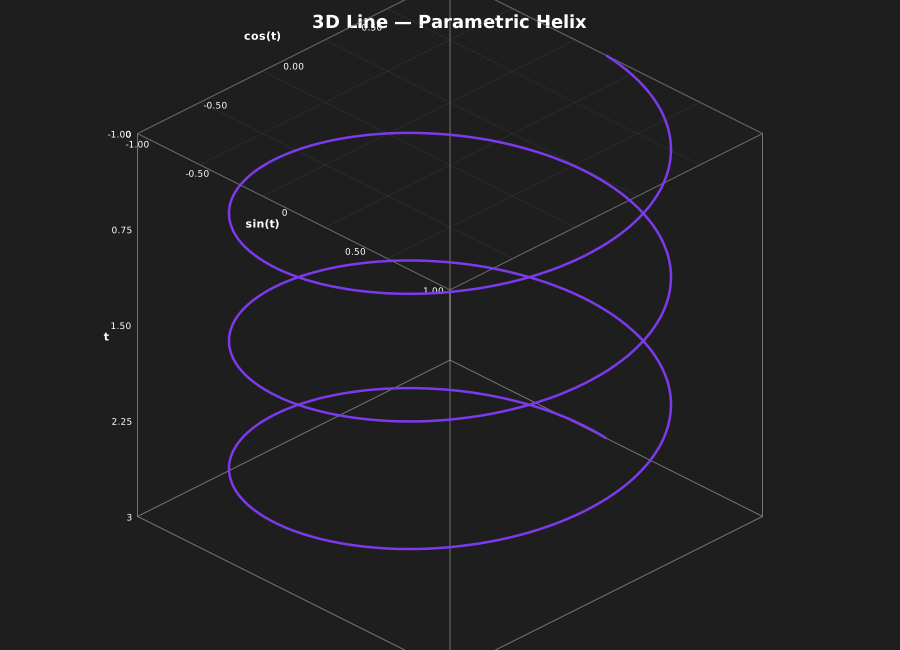
Parametric curves in 3-D space. LTTB downsampling runs in camera-projected screen coordinates, so visible detail adapts to the viewing angle.
from glyphx import Figure3D
from glyphx.line3d import Line3DSeries
import numpy as np

# Helix
t = np.linspace(0, 6 * np.pi, 1_000)
fig = Figure3D(title="Parametric Helix", theme="dark")
fig.line3d(np.cos(t), np.sin(t), t / (2 * np.pi),
           color="#7c3aed", width=2.5, label="Helix")
fig.show()

# Lissajous curve (3:2:1)
t = np.linspace(0, 2 * np.pi, 500)
fig = Figure3D(title="Lissajous 3:2:1")
fig.line3d(np.sin(3*t), np.sin(2*t), np.sin(t), color="#0891b2", width=2)
fig.show()
3-D Bar Chart
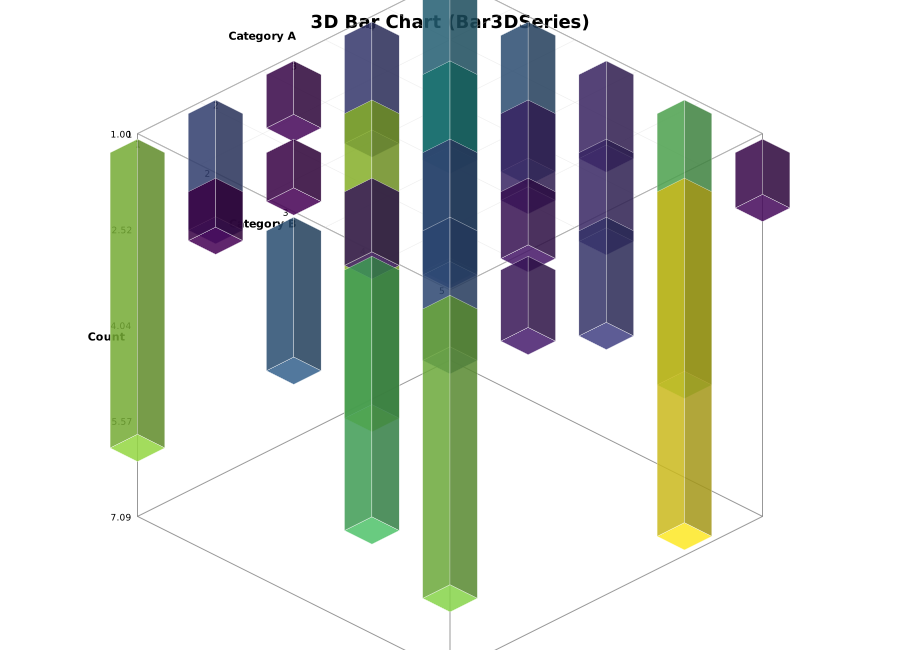
Vertical bars on a 2-D (x, y) base grid, useful for cross-tabulations and
2-D frequency histograms.
from glyphx import Figure3D
from glyphx.bar3d import Bar3DSeries
import numpy as np

x_cats  = np.arange(1, 6)
y_cats  = np.arange(1, 6)
heights = np.abs(np.random.randn(5, 5)) * 3 + 1   # shape (n_y, n_x)

fig = Figure3D(title="3D Bar Chart")
fig.bar3d(x_cats, y_cats, heights, cmap="viridis")
fig.show()

# Monthly revenue by product line (4 products x 12 months)
months   = list(range(1, 13))
products = list(range(1, 5))
revenue  = np.abs(np.random.randn(4, 12) * 0.5 + 2)

fig = Figure3D(title="Monthly Revenue by Product", theme="dark")
fig.set_xlabel("Month").set_ylabel("Product").set_zlabel("Revenue ($M)")
fig.bar3d(months, products, revenue, cmap="plasma")
fig.show()
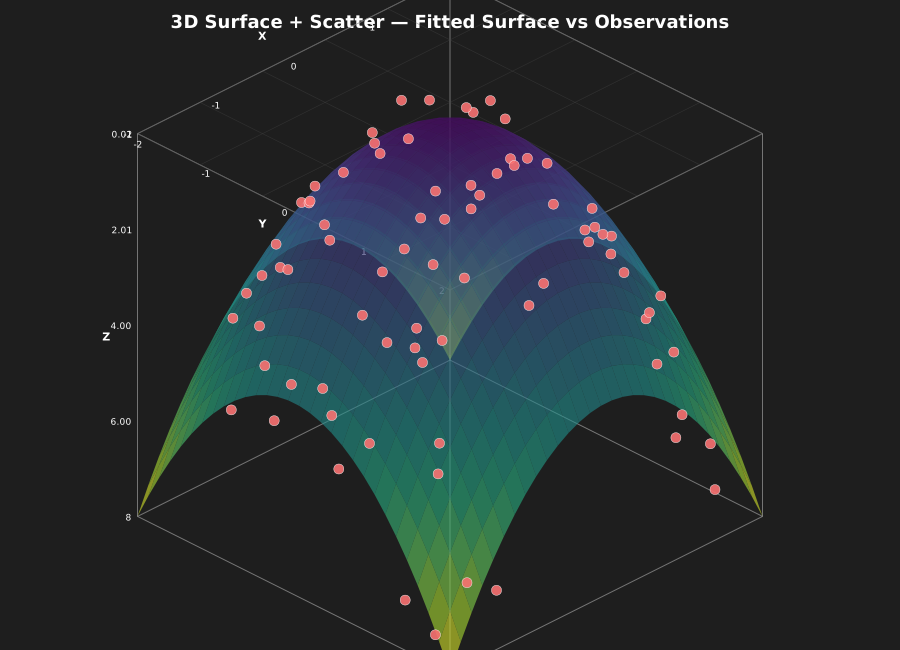
Surface + Scatter Overlay
Overlay observed data points on a fitted surface – a common pattern in machine learning and scientific visualisation.
import numpy as np
from glyphx import Figure3D

# Fitted surface  z = x^2 + y^2
x = np.linspace(-2, 2, 30)
y = np.linspace(-2, 2, 30)
X, Y = np.meshgrid(x, y)
Z_fit = X**2 + Y**2

# Noisy observations
obs_x = np.random.uniform(-2, 2, 80)
obs_y = np.random.uniform(-2, 2, 80)
obs_z = obs_x**2 + obs_y**2 + np.random.randn(80) * 0.3

fig = Figure3D(title="Fitted Surface vs Observations", theme="dark")
fig.surface(x, y, Z_fit, cmap="viridis", alpha=0.60)
fig.scatter(obs_x, obs_y, obs_z,
            color="#f87171", size=5, label="Observations")
fig.show()
2-D Contour Plot
ContourSeries uses the marching-squares algorithm to draw filled contours
on a regular 2-D grid – a 2-D companion to Surface3DSeries.
from glyphx import Figure
from glyphx.contour import ContourSeries
import numpy as np

x = np.linspace(-4, 4, 80)
y = np.linspace(-4, 4, 80)
X, Y = np.meshgrid(x, y)
Z = np.exp(-(X**2 + Y**2) / 4) * np.cos(X) * np.cos(Y)

fig = Figure(width=680, height=560)
fig.set_title("2D Contour -- marching squares")
fig.add(ContourSeries(x, y, Z, levels=14, cmap="coolwarm",
                      filled=True, lines=True))
fig.show()

# Rosenbrock function (banana valley)
x = np.linspace(-2, 2, 60)
y = np.linspace(-1, 3, 60)
X, Y = np.meshgrid(x, y)
Z = np.log1p((1 - X)**2 + 100*(Y - X**2)**2)

fig = Figure(width=680, height=560)
fig.set_title("Rosenbrock Function")
fig.add(ContourSeries(x, y, Z, levels=16, cmap="inferno",
                      filled=True, lines=True))
fig.show()
Themes
The seven 2-D themes all work in 3-D. dark is recommended for
presentations; ocean suits data-heavy dashboards.
for theme in ["default", "dark", "ocean", "warm", "colorblind"]:
    fig = Figure3D(title=f"Surface -- {theme}", theme=theme)
    fig.surface(x, y, Z, cmap="viridis", alpha=0.88)
    fig.save(f"surface_{theme}.html")
Large-Data Downsampling
GlyphX automatically downsamples every 3-D series before SVG generation.
Inspect what happened via last_downsample_info:
import numpy as np
from glyphx import Figure3D
from glyphx.scatter3d import Scatter3DSeries
from glyphx.surface3d import Surface3DSeries
from glyphx.line3d    import Line3DSeries

rng = np.random.default_rng(0)
n   = 500_000

# Scatter -- 3D voxel thinning
s3 = Scatter3DSeries(rng.uniform(0,1,n), rng.uniform(0,1,n),
                      rng.uniform(0,1,n), cmap="plasma")
Figure3D().add(s3).render_svg()
print(s3.last_downsample_info)
# {'algorithm': 'voxel-3D', 'original_n': 500000, 'thinned_n': 4913}

# Line -- LTTB in camera-projected screen space
t  = np.linspace(0, 10 * np.pi, 200_000)
l3 = Line3DSeries(np.cos(t), np.sin(t), t / (10 * np.pi))
Figure3D().add(l3).render_svg()
print(l3.last_downsample_info)
# {'algorithm': 'lttb-3D', 'original_n': 200000, 'thinned_n': 5000}

# Surface -- grid decimation + sub-pixel face culling
x  = np.linspace(-5, 5, 500)
y  = np.linspace(-5, 5, 500)
Z  = np.sin(np.sqrt(np.meshgrid(x,y)[0]**2 + np.meshgrid(x,y)[1]**2))
s3 = Surface3DSeries(x, y, Z)
Figure3D().add(s3).render_svg()
print(s3.last_downsample_info)
# {'algorithm': 'grid-decimate', 'original_n': 249001, 'thinned_n': ...}
Override the budget per series:
# Keep more detail on this scatter
s3 = Scatter3DSeries(xs, ys, zs, threshold=20_000)

# Fast thumbnail -- aggressive thinning
s3 = Scatter3DSeries(xs, ys, zs, threshold=500)
Interactive Controls
Every Figure3D HTML output ships with the full GlyphX 3-D control set:
Input |
Action |
|---|---|
Drag |
Rotate camera (orbit) |
Right-drag / Ctrl+drag |
Pan (translate camera target) |
Scroll wheel |
Zoom in / out |
Two-finger pinch (touch) |
Zoom |
Arrow keys |
Rotate by 3 degrees per press |
|
Zoom in / out |
|
Toggle auto-rotate |
|
Reset camera to default view |
|
Camera preset: ISO / Top / Front / Side |
|
Save PNG screenshot |
|
Toggle fullscreen |
|
Show keyboard shortcut overlay |
|
Deselect / close overlay |
Click scatter point |
Highlight and show coordinates in readout strip |
Click legend item |
Toggle that series visible / hidden |
Saving and Sharing
fig = Figure3D(title="My Chart")
fig.scatter(xs, ys, zs)

# Interactive HTML (self-contained, zero CDN except Three.js)
fig.save("chart3d.html")

# Static SVG fallback (orthographic projection, painter's sort)
svg = fig.render_svg()
open("chart3d.svg", "w", encoding="utf-8").write(svg)

# One-liner shorthand
from glyphx import plot3d
plot3d(xs, ys, zs, kind="scatter", title="Quick 3D")
plot3d(x,  y,  Z,  kind="surface", title="Quick Surface")
Themes
Dark Theme
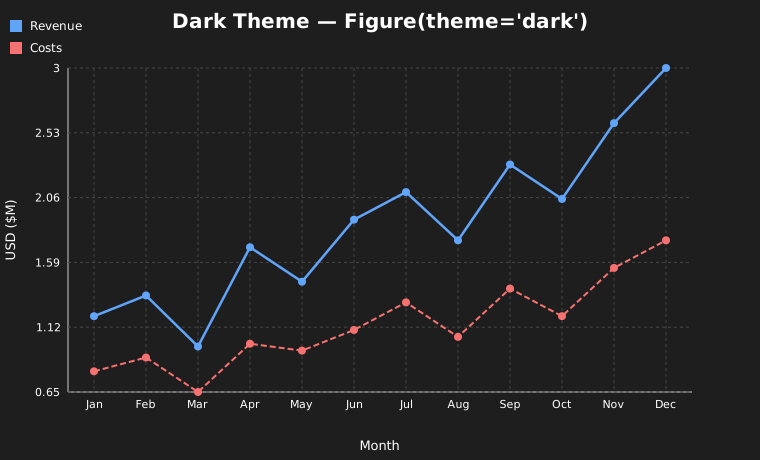
Figure(theme="dark")
Colorblind-Safe Theme
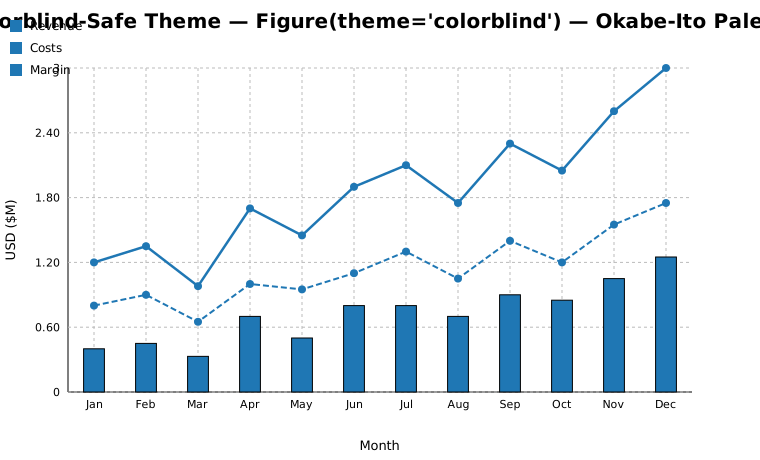
Figure(theme="colorblind") # Okabe-Ito palette
Line Styles
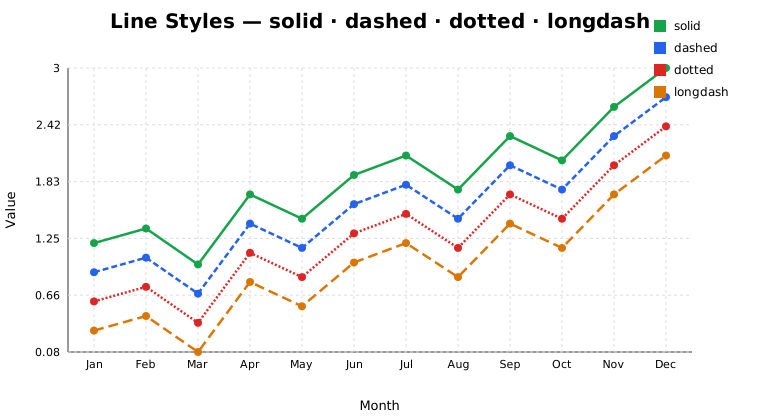
LineSeries(x, y, linestyle="solid")
LineSeries(x, y, linestyle="dashed")
LineSeries(x, y, linestyle="dotted")
LineSeries(x, y, linestyle="longdash")
Colormap Encoding
Layout
2×2 Subplot Grid
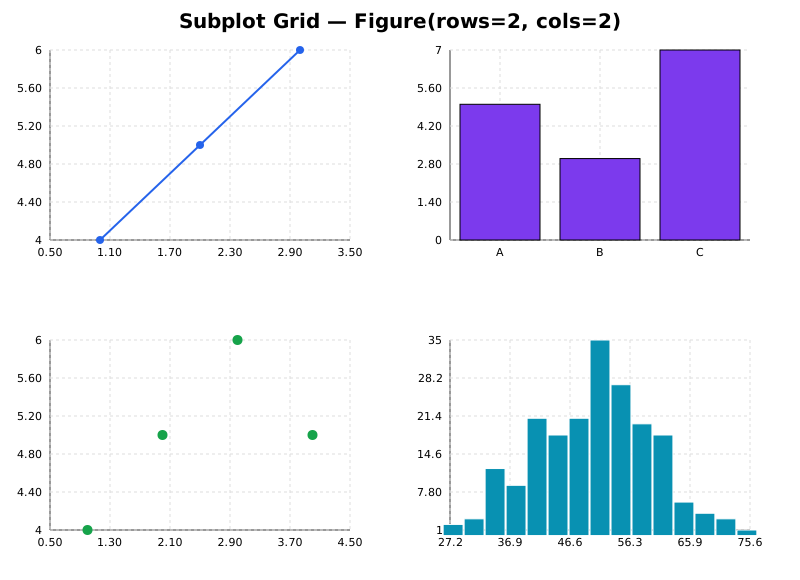
fig = Figure(rows=2, cols=2, width=800, height=580)
fig.add_axes(0,0).add_series(LineSeries(...))
fig.add_axes(0,1).add_series(BarSeries(...))
fig.add_axes(1,0).add_series(ScatterSeries(...))
fig.add_axes(1,1).add_series(HistogramSeries(...))
Dual Y-Axis
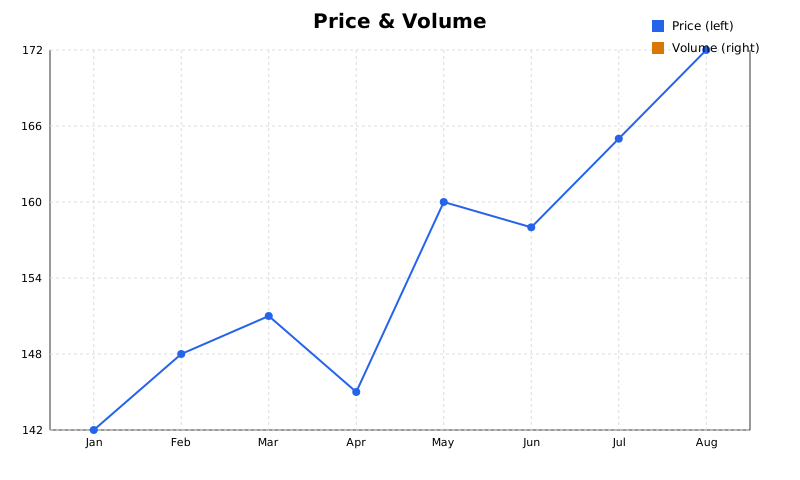
fig.add(LineSeries(x, prices, label="Price (left)"))
fig.add(BarSeries(x, volume, label="Volume (right)"), use_y2=True)
DataFrame Accessor
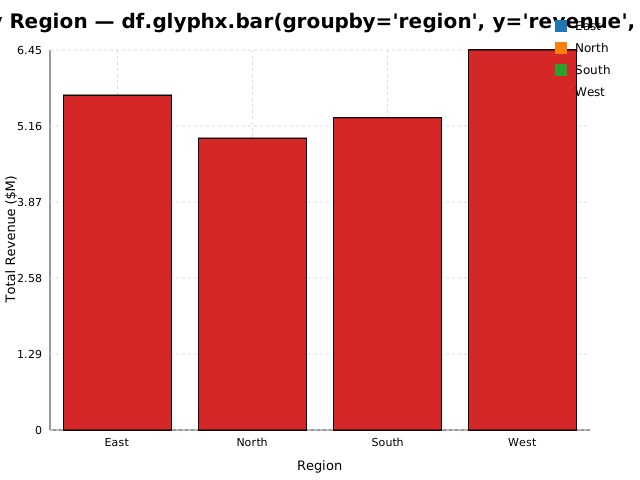
import glyphx  # registers df.glyphx

# Basic
df.glyphx.bar(x="month", y="revenue", title="Monthly Revenue")
df.glyphx.bar(groupby="region", y="revenue", agg="sum")

# Hue splitting — one series per region, auto-colored
df.glyphx.bar(x="month", y="revenue", hue="region",
              title="Revenue by Month and Region")
Statistical Charts
ECDF
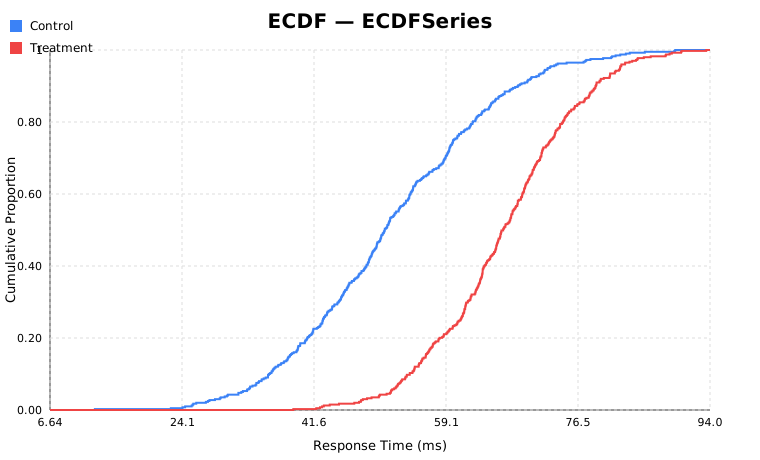
from glyphx.ecdf import ECDFSeries

fig = (
    Figure()
    .add(ECDFSeries(ctrl.tolist(),  color="#3b82f6", label="Control"))
    .add(ECDFSeries(treat.tolist(), color="#ef4444", label="Treatment"))
)
Raincloud Plot
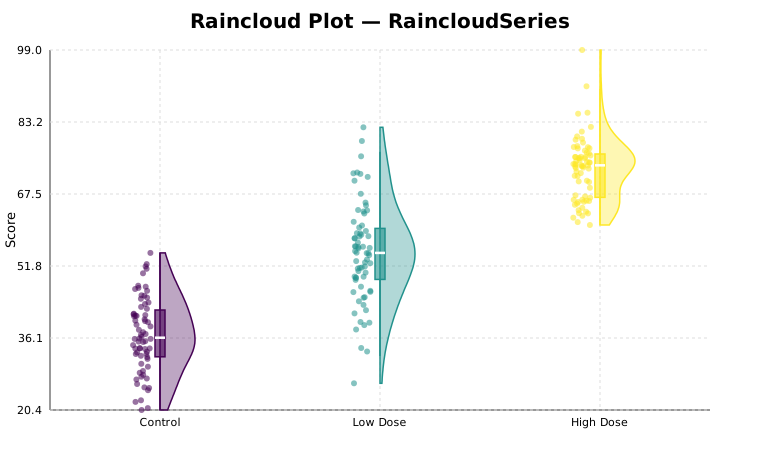
from glyphx.raincloud import RaincloudSeries

fig.add(RaincloudSeries(groups, categories=["Control","Low","High"], seed=42))
Significance Brackets
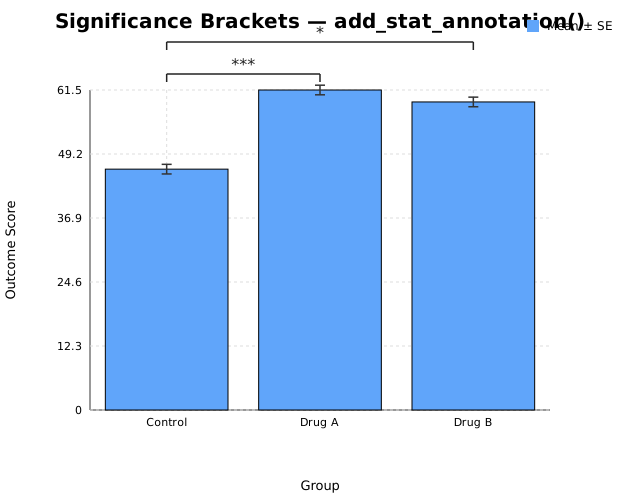
fig.add_stat_annotation("Control", "Drug A", p_value=0.0002)
fig.add_stat_annotation("Control", "Drug B", p_value=0.028, y_offset=32)
Financial Charts
Candlestick OHLC
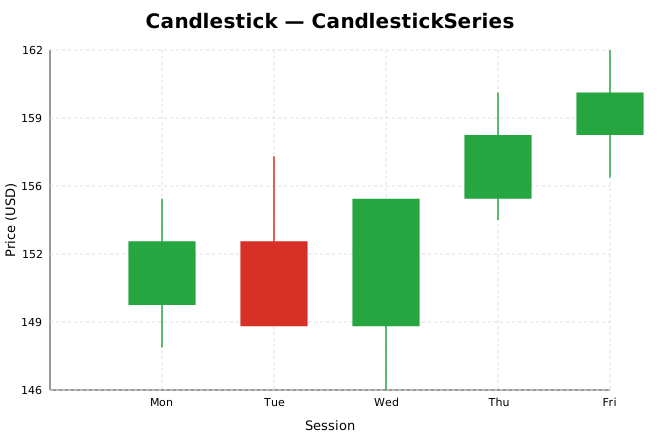
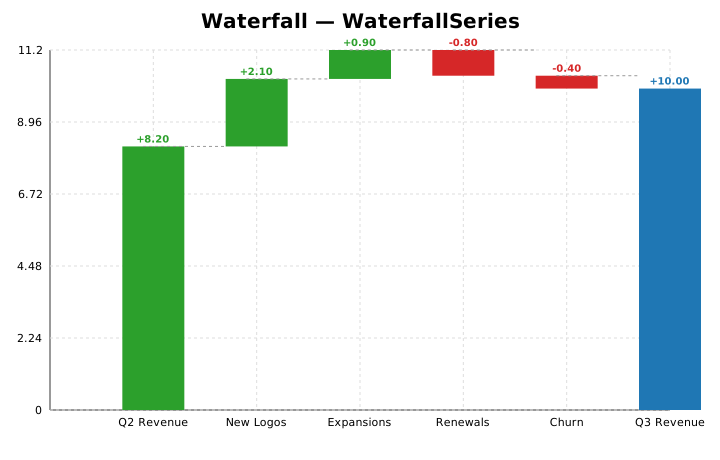
Waterfall Bridge Chart
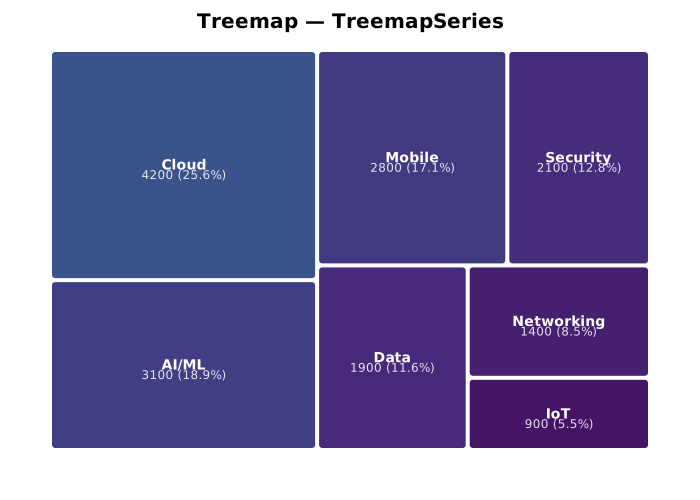
Treemap
Streaming Data
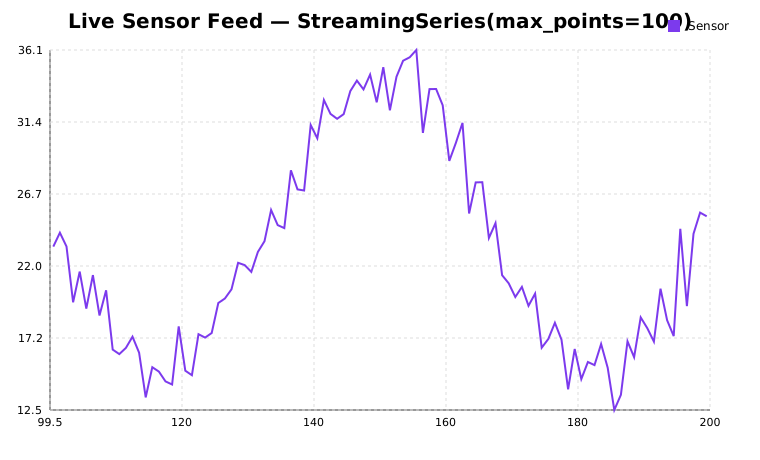
from glyphx.streaming import StreamingSeries

stream = StreamingSeries(max_points=120, color="#2563eb", label="Sensor A")
fig.add(stream)

with stream.live(fig, fps=10) as s:
    for reading in sensor_generator():
        s.push(reading)
Downsampling Examples
See also Large-Data Downsampling for the complete downsampling API reference.
Two-stage line pipeline (M4 + LTTB)
from glyphx.downsample import maybe_downsample_line
import numpy as np

x = np.linspace(0, 1, 2_000_000)
y = np.sin(x * 500) + np.random.normal(0, 0.1, len(x))

x_down, y_down = maybe_downsample_line(x, y, pixel_width=800)
print(f"{len(x):,} → {len(x_down):,} points")
Per-series threshold override
from glyphx import Figure
from glyphx.series import LineSeries

x = list(range(100_000))
y = [i**0.5 for i in x]

# Keep at most 500 points for this series
fig = Figure()
fig.add(LineSeries(x, y, label="sqrt(x)", threshold=500))
fig.show()
Inspect downsampling metadata
from glyphx import Figure
from glyphx.series import ScatterSeries
import numpy as np

rng = np.random.default_rng(0)
n = 50_000
sc = ScatterSeries(rng.uniform(0,1,n).tolist(),
                   rng.uniform(0,1,n).tolist())
Figure().add(sc).render_svg()

info = sc.last_downsample_info
print(f"Algorithm : {info['algorithm']}")
print(f"Original  : {info['original_n']:,}")
print(f"Thinned   : {info['thinned_n']:,}")
Gantt / Timeline Chart
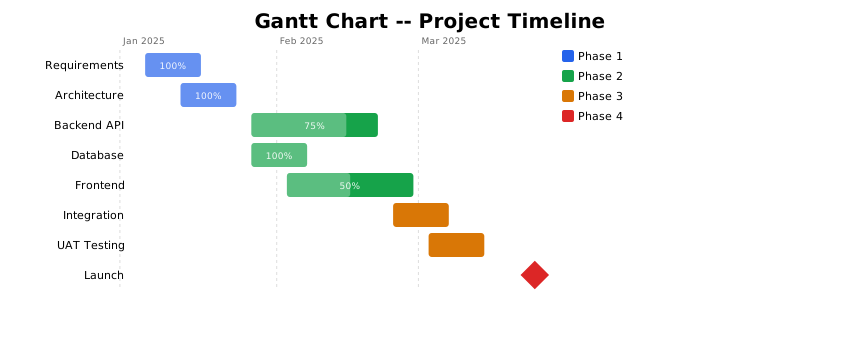
from glyphx import Figure
from glyphx.gantt import GanttSeries
from datetime import date

tasks = [
    {"task": "Design",   "start": date(2025,1,6),  "end": date(2025,1,17), "group": "Phase 1"},
    {"task": "Backend",  "start": date(2025,1,20), "end": date(2025,2,14), "group": "Phase 2"},
    {"task": "Frontend", "start": date(2025,1,27), "end": date(2025,2,21), "group": "Phase 2"},
    {"task": "Launch",   "start": date(2025,3,3),  "end": date(2025,3,3),  "group": "Phase 3",
     "milestone": True},
]

fig = Figure(width=860, height=360)
fig.gantt(tasks, group_colors={"Phase 1": "#2563eb",
                                "Phase 2": "#16a34a",
                                "Phase 3": "#dc2626"})
fig.show()

# Progress bars and tooltips
tasks[0]["progress"] = 0.75   # 75% complete
tasks[0]["tooltip"]  = "Design: 3 of 4 tasks done"
Stacked Bar Chart
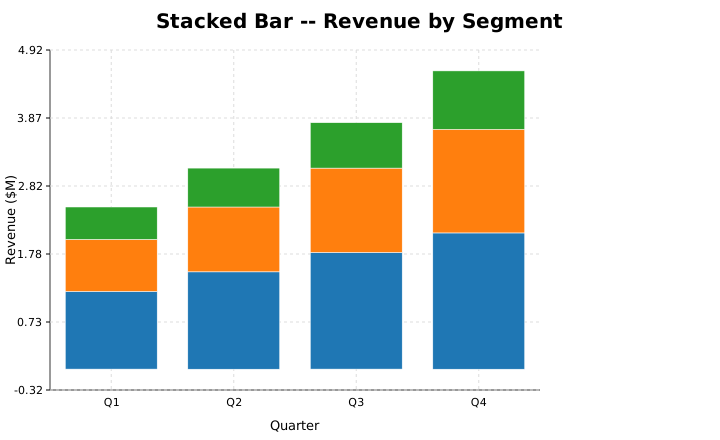
from glyphx import Figure

fig = Figure()
fig.stacked_bar(
    x=["Q1", "Q2", "Q3", "Q4"],
    series={
        "Cloud":  [1.2, 1.5, 1.8, 2.1],
        "AI/ML":  [0.8, 1.0, 1.3, 1.6],
        "Mobile": [0.5, 0.6, 0.7, 0.9],
    },
)
fig.show()

# 100% normalized stacked
fig.stacked_bar(x=["Q1","Q2","Q3","Q4"], series=revenue_by_segment,
                normalize=True)
Bump Chart
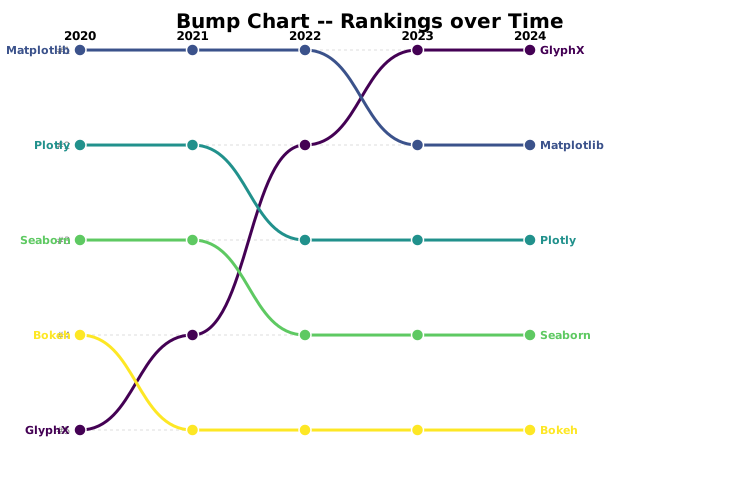
Rank-over-time visualization — no native equivalent in Matplotlib, Seaborn, or Plotly:
from glyphx import Figure

fig = Figure(width=820, height=520)
fig.bump(
    x=["2020", "2021", "2022", "2023", "2024"],
    rankings={
        "GlyphX":     [5, 4, 2, 1, 1],
        "Matplotlib": [1, 1, 1, 2, 2],
        "Plotly":     [2, 2, 3, 3, 3],
        "Seaborn":    [3, 3, 4, 4, 4],
    },
)
fig.show()
Sparklines
Tiny inline charts for dashboards and KPI tables:
from glyphx.sparkline import sparkline_svg

# Returns a raw SVG string — embed directly in HTML tables
svg = sparkline_svg([1.2, 1.8, 1.5, 2.3, 2.7, 3.1], width=80, height=28)

# Bar variant
svg = sparkline_svg(data, kind="bar", color="#dc2626")

# As a Figure series
from glyphx import Figure
from glyphx.sparkline import SparklineSeries
fig = Figure(width=120, height=40)
fig.sparkline([1, 3, 2, 5, 4, 6])
AI Chart Recommendation
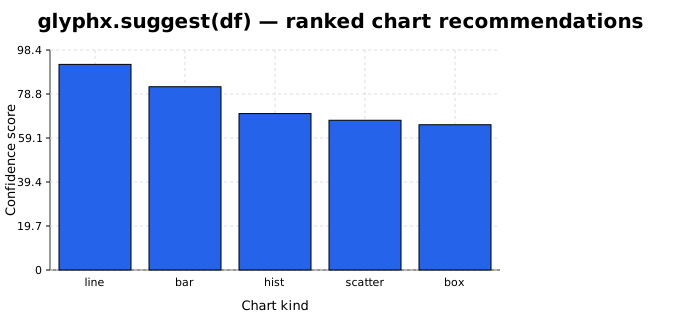
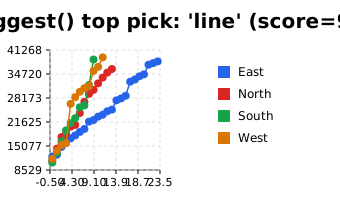
glyphx.suggest() inspects a DataFrame and returns ranked chart recommendations
with mini preview figures — no external dependencies required:
from glyphx import suggest
import pandas as pd

df = pd.read_csv("sales.csv")
recs = suggest(df, top_n=5)

for rec in recs:
    print(f"{rec.kind:12s}  score={rec.score:.0f}")
    print(f"  {rec.reason}")
    rec.preview.show()   # 340×220 mini figure

# Access recommendation metadata
best = recs[0]
print(best.kind, best.x_col, best.y_col, best.hue_col)
The preview property renders a 340x220 mini figure using the actual data:
Responsive Dark-Mode SVG
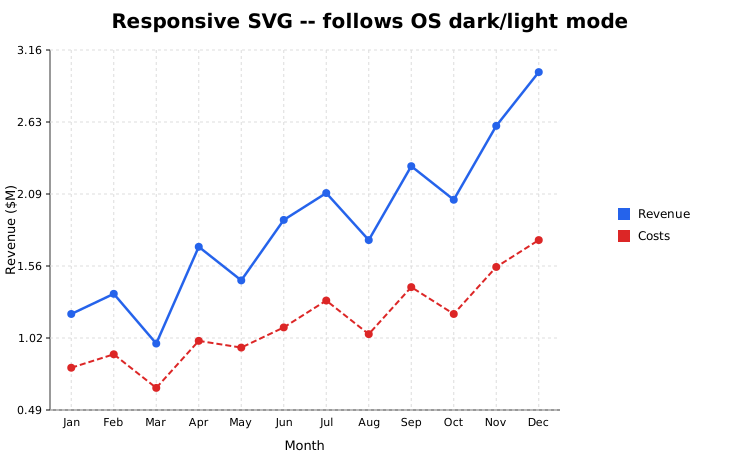
Figure.render_responsive() outputs an SVG that changes colour automatically
when the operating system switches dark mode — no Python re-render needed:
from glyphx import Figure
from glyphx.series import LineSeries
from pathlib import Path

fig = Figure()
fig.add(LineSeries(months, revenue, label="Revenue"))

# Embed CSS custom properties; browser swaps them on OS dark mode
svg = fig.render_responsive(dark_theme="dark")
Path("chart_responsive.svg").write_text(svg)
# Open in any modern browser — colours follow prefers-color-scheme
Hierarchically Clustered Heatmap (Clustermap)
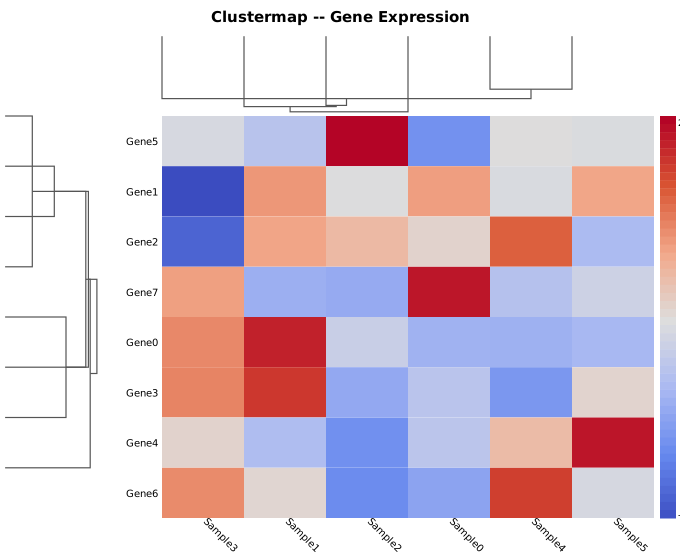
Seaborn’s most distinctive bioinformatics chart, now in pure NumPy — no scipy required:
import pandas as pd
from glyphx.clustermap import clustermap

df = pd.read_csv("gene_expression.csv", index_col=0)

# Basic clustermap with dendrograms on both axes
fig = clustermap(df, cmap="viridis", row_cluster=True, col_cluster=True,
                 title="Gene Expression Heatmap")
fig.show()

# Z-score normalised rows (standard in bioinformatics)
fig = clustermap(df, z_score="row", cmap="coolwarm",
                 title="Z-scored Gene Expression")
fig.show()
Hue on Statistical Charts
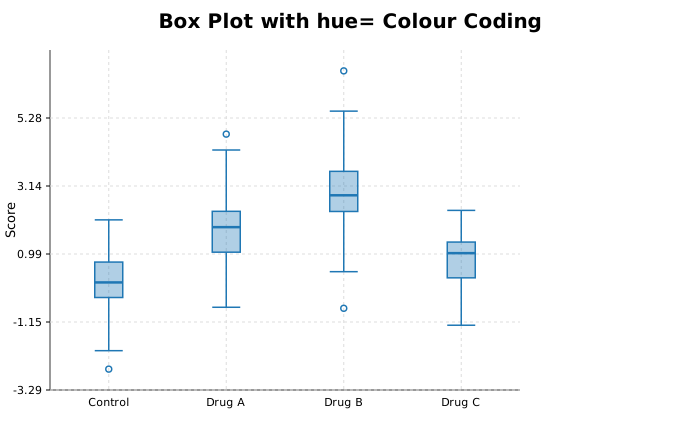
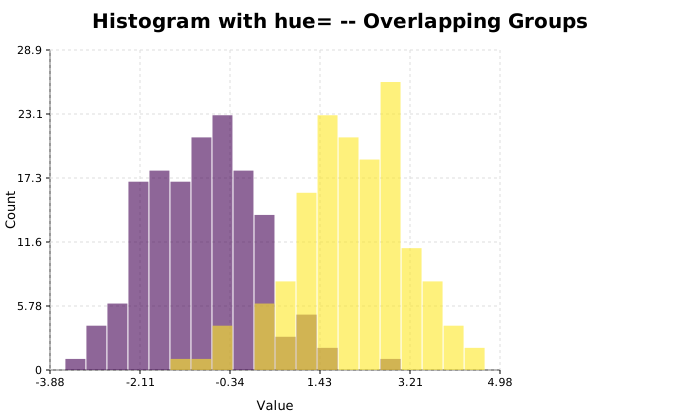
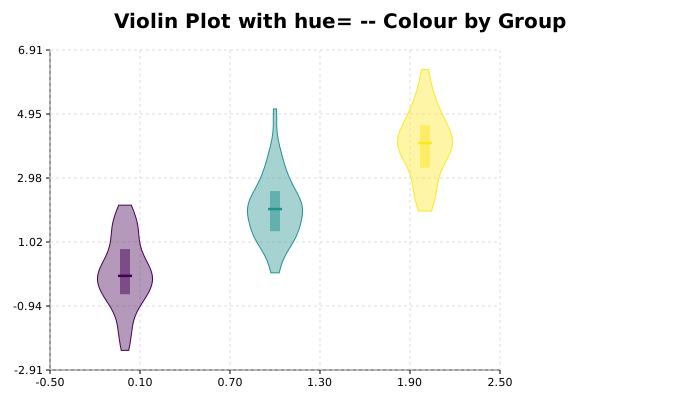
All statistical chart types now accept hue= and hue_colors=:
from glyphx import Figure
from glyphx.series import BoxPlotSeries, HistogramSeries
from glyphx.violin_plot import ViolinPlotSeries
import numpy as np

# Box plot with hue
data = [control_scores, drug_a_scores, drug_b_scores]
fig = Figure()
fig.add(BoxPlotSeries(data, categories=["Control","Drug A","Drug B"],
                      hue=["Placebo","Treatment","Treatment"],
                      hue_colors=["#2563eb","#dc2626"]))
fig.show()

# Overlapping histograms by group
fig = Figure()
fig.add(HistogramSeries(all_scores, bins=20,
                        hue=group_labels,   # list same length as all_scores
                        alpha=0.55))
fig.show()

# Colour-coded violins
fig = Figure()
fig.add(ViolinPlotSeries(datasets, hue=["Male","Female","Male","Female"],
                          cmap="viridis"))
fig.show()
Vega-Lite JSON Export
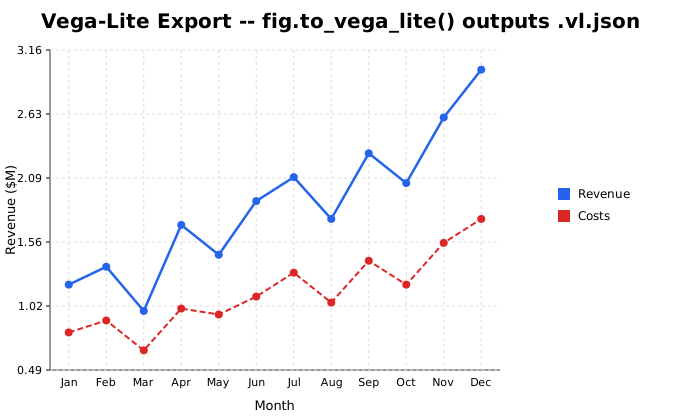
Export any GlyphX figure to a Vega-Lite v5 specification — the first Python plotting library to produce Vega-Lite output:
from glyphx import Figure
from glyphx.series import LineSeries
from glyphx.vega_lite import to_vega_lite, save_vega_lite

fig = (Figure()
       .set_title("Monthly Revenue")
       .add(LineSeries(months, revenue, label="Revenue")))

# Get the spec as a Python dict
spec = to_vega_lite(fig)

# Save as a .vl.json file (open in vega-lite.github.io/editor)
save_vega_lite(fig, "chart.vl.json")

# Or use the Figure method directly
fig.to_vega_lite("chart.vl.json")

# Render with Altair (if installed)
import altair as alt
chart = alt.Chart.from_dict(spec)
chart.show()
FacetGrid — Small Multiples
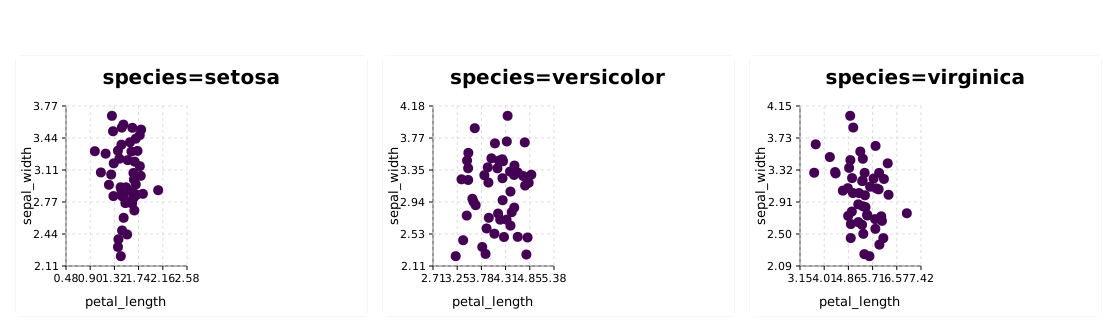
Small-multiples grids with the Seaborn .map() API:
import pandas as pd
from glyphx.facet_grid import FacetGrid

# Each species gets its own scatter subplot
g = FacetGrid(penguins_df, col="species", hue="sex",
              height=300, aspect=1.4)
g.map("scatter", x="bill_length_mm", y="flipper_length_mm")
g.show()

# Histogram per group
g = FacetGrid(tips_df, col="day", height=250, aspect=1.2)
g.map("hist", x="total_bill")
g.show()

# Wrap into 2 columns
g = FacetGrid(df, col="category", col_wrap=2, height=280)
g.map("line", x="date", y="value")
g.save("facets.svg")
Regression Plot
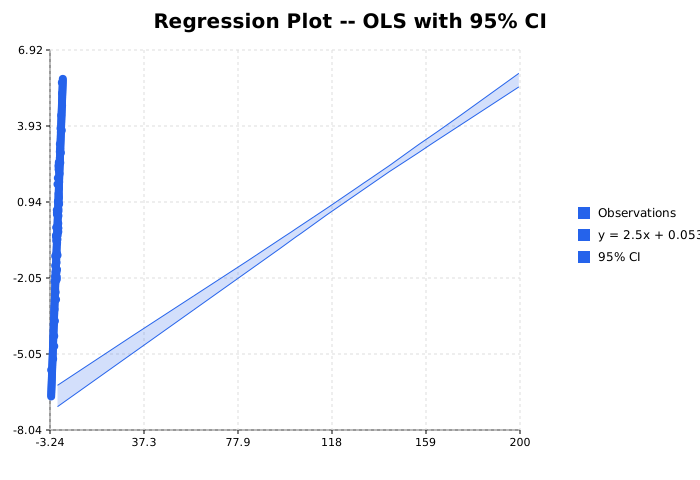
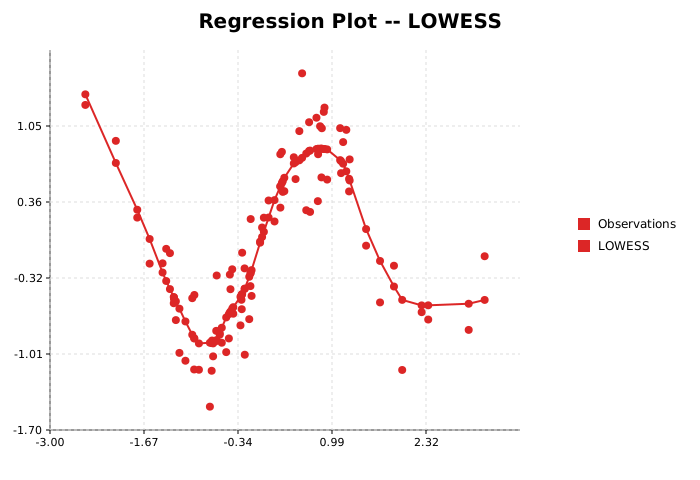
OLS, polynomial, logistic, and LOWESS regression — pure NumPy:
from glyphx.regplot import regplot

# Ordinary least squares with CI band
fig = regplot(df, x="bill_length", y="body_mass")
fig.show()

# Polynomial degree-2
fig = regplot(df, x="age", y="income", order=2, color="#dc2626")

# LOWESS (no parametric assumption)
fig = regplot(df, x="gdp_per_cap", y="life_expectancy", lowess=True)

# Logistic (binary outcome)
fig = regplot(df, x="dose_mg", y="responded", logistic=True)

# From raw arrays
import numpy as np
x = np.random.randn(200)
y = 2*x + np.random.randn(200)*0.5
fig = regplot(None, x_vals=x, y_vals=y, title="Correlation")
Choropleth Map
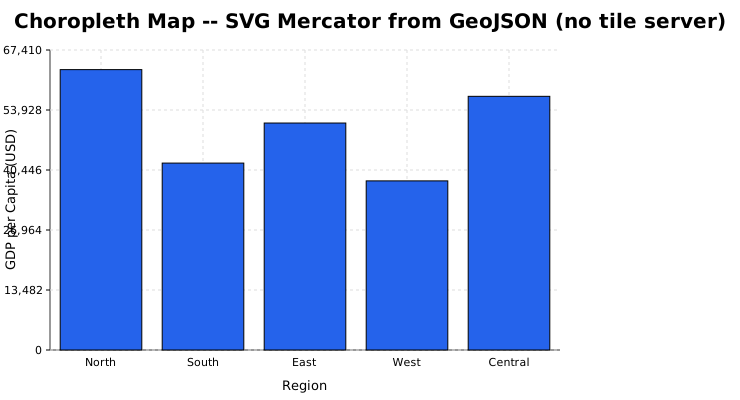
SVG choropleth maps from GeoJSON — no tile server or CDN:
import json
from glyphx import Figure
from glyphx.choropleth import ChoroplethSeries

geo  = json.load(open("countries.geojson"))
data = {"USA": 63000, "GBR": 42000, "DEU": 51000, "FRA": 45000}

fig = Figure(width=900, height=500)
fig.add(ChoroplethSeries(geo, data,
                          key="iso_a3",          # GeoJSON property name
                          cmap="viridis",
                          missing_color="#e0e0e0"))
fig.set_title("GDP per Capita (USD)")
fig.show()

# Dark theme
fig = Figure(width=900, height=500, theme="dark")
fig.choropleth(geo, data, key="iso_a3", cmap="plasma")
fig.show()
ScatterSeries — Per-Point Size Encoding
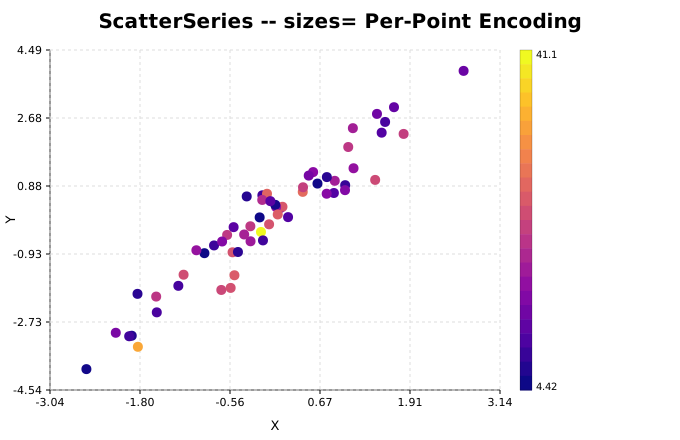
Encode a fourth variable as marker size (Seaborn sizes= parity):
from glyphx import Figure
from glyphx.series import ScatterSeries

fig = Figure()
fig.add(ScatterSeries(
    x=gdp_per_cap,
    y=life_expectancy,
    sizes=population,      # per-point marker radius array
    c=continent_code,      # colormap encoding
    cmap="viridis",
    label="Countries",
))
fig.show()