Usage Guide
Basic Plotting
Use plot() for the fastest path to any chart type:
from glyphx import plot

# Line chart
plot([1, 2, 3, 4], [5, 7, 3, 9], kind="line",
     color="#2563eb", label="Series A",
     xlabel="X Axis", ylabel="Y Axis", title="Line Chart")

# Bar chart with categorical X axis
plot(["Mon","Tue","Wed","Thu","Fri"], [42, 61, 38, 75, 53],
     kind="bar", color="#7c3aed", title="Daily Active Users")

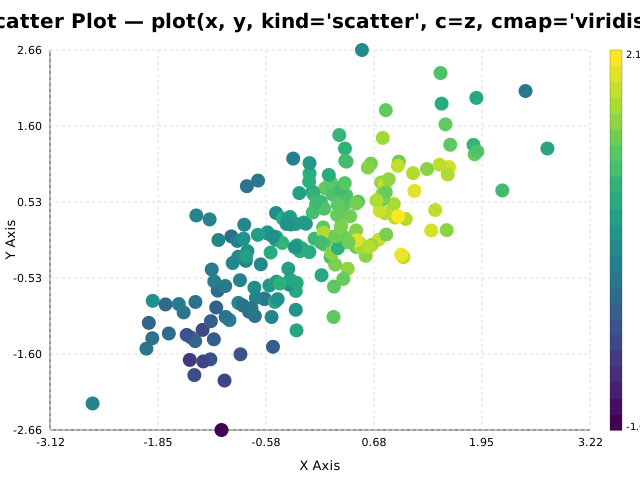
# Scatter plot with colormap encoding
plot(x_data, y_data, kind="scatter",
     c=color_values, cmap="viridis", size=7)

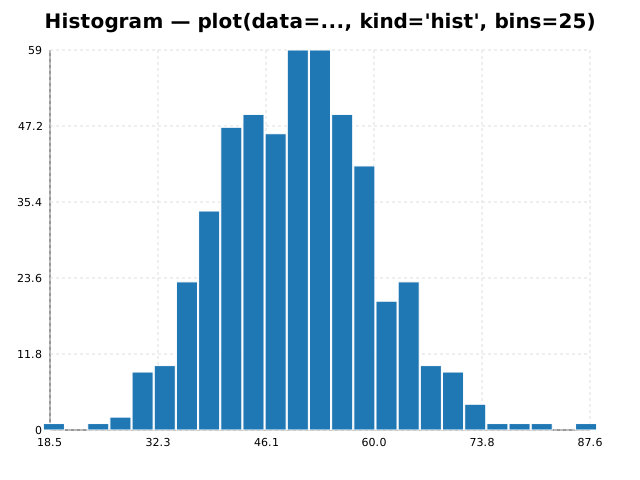
# Histogram from raw data
import numpy as np
plot(data=np.random.normal(50, 10, 500), kind="hist", bins=25)

# Pie chart
plot(data=[35, 28, 22, 15], kind="pie",
     labels=["Product A","Product B","Product C","Other"])
Method Chaining
Every mutating Figure method returns self, enabling full fluent chains:
from glyphx import Figure
from glyphx.series import LineSeries, BarSeries

fig = (
    Figure(width=800, height=500)
    .set_title("Revenue Dashboard")
    .set_theme("dark")
    .set_size(900, 520)
    .set_xlabel("Month")
    .set_ylabel("USD ($M)")
    .set_legend("top-left")
    .add(LineSeries(months, revenue, color="#60a5fa", label="Revenue", width=2.5))
    .add(LineSeries(months, costs, color="#f87171", label="Costs", linestyle="dashed"))
    .annotate("Record High", x=11, y=2.9, arrow=True, color="#fbbf24")
    .tight_layout()
    .share("dashboard.html")
)
Chainable Figure methods:
Method |
Description |
|---|---|
|
Add a series; bind to right Y-axis with |
|
Set chart title |
|
Apply a named or custom theme |
|
Resize canvas |
|
X-axis label |
|
Y-axis label |
|
Right-hand Y-axis label; no-op without |
|
Legend position or |
|
Tick label formatter, applied to X, Y1 and Y2 |
|
Minor tick subdivisions between majors |
|
Wrap long X tick labels instead of rotating them |
|
Panel drawn over the plot area with its own scales |
|
Add a text annotation with optional arrow |
|
Add a significance bracket |
|
Auto-adjust padding and rotate crowded labels |
|
Synchronized crosshair across all charts on the page |
|
Display (Jupyter or browser) |
|
Save to |
|
Self-contained, zero-CDN HTML |
DataFrame Accessor
Import glyphx once and every pd.DataFrame gains a .glyphx namespace.
All methods return a Figure for further chaining:
import pandas as pd
import glyphx          # registers the .glyphx accessor

df = pd.read_csv("sales.csv")

# Basic charts
df.glyphx.line(x="date",    y="revenue", title="Daily Revenue")
df.glyphx.bar( x="product", y="units",   title="Units by Product")
df.glyphx.scatter(x="spend", y="conversions")
df.glyphx.hist(col="response_time", bins=20)
df.glyphx.box(col="score", groupby="treatment_group")
df.glyphx.pie(labels="category", values="share")
df.glyphx.heatmap()        # uses all numeric columns

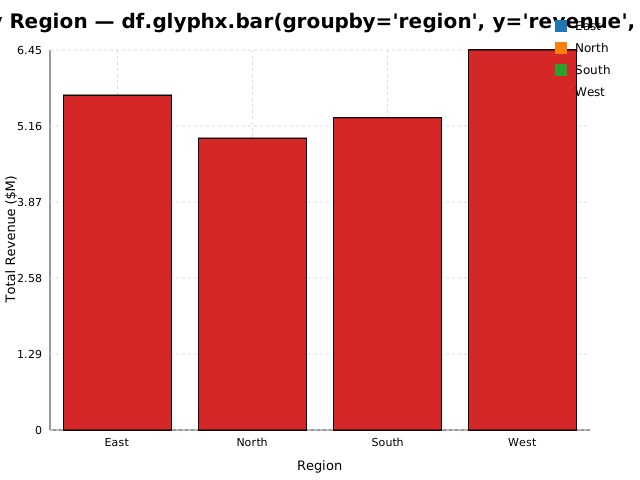
# Groupby aggregation in one call
df.glyphx.bar(
    groupby="region",
    y="revenue",
    agg="sum",             # sum | mean | count | max | min
    title="Revenue by Region",
)

# Hue splitting — one BarSeries per unique hue value, auto-colored
# Each group gets its own label (appears in the legend) and a distinct
# color from the active theme palette.
df.glyphx.bar(
    x="month",
    y="revenue",
    hue="region",          # splits into North / South series
    title="Revenue by Month and Region",
)

# Full chain from the accessor
(df.glyphx
   .bar(x="month", y="revenue", label="Revenue", auto_display=False)
   .set_theme("colorblind")
   .add_stat_annotation("Jan", "Jun", p_value=0.001)
   .set_xlabel("Month")
   .set_ylabel("Revenue ($M)")
   .share("monthly_report.html"))
Note
When both x= and hue= are provided, bar() produces one
BarSeries per unique hue value filtered to its own rows.
When only hue= is given (without x=), it aggregates using agg=
and creates one bar per group.
3-D Charts
Use Figure3D for interactive Three.js output with an SVG fallback:
from glyphx import Figure3D, plot3d
from glyphx.scatter3d import Scatter3DSeries
from glyphx.surface3d  import Surface3DSeries
from glyphx.line3d     import Line3DSeries
from glyphx.bar3d      import Bar3DSeries
from glyphx.contour    import ContourSeries
import numpy as np

# Scatter — continuous color via colormap
fig = Figure3D(title="Gaussian Clusters", theme="dark",
               azimuth=45, elevation=30,
               xlabel="X", ylabel="Y", zlabel="Z")
fig.add(Scatter3DSeries(xs, ys, zs, c=zs, cmap="plasma",
                        size=4, label="Points"))
fig.show()      # WebGL interactive viewer
fig.save("scatter3d.html")

# Surface — z = f(x, y) over a regular grid
x = np.linspace(-3, 3, 60)
y = np.linspace(-3, 3, 60)
Z = np.sin(np.sqrt(x[None,:]**2 + y[:,None]**2))
fig = Figure3D(title="Sinc Surface")
fig.add(Surface3DSeries(x, y, Z, cmap="viridis",
                        wireframe=True, alpha=0.9))
fig.show()

# Polyline through 3-D space
t = np.linspace(0, 4*np.pi, 500)
fig = Figure3D(title="Helix")
fig.add(Line3DSeries(np.cos(t), np.sin(t), t / (4*np.pi),
                     color="#dc2626", width=2))
fig.show()

# Bar3D
fig = Figure3D(title="3D Bars")
fig.add(Bar3DSeries(x_cats, y_cats, heights,
                    color="#2563eb", label="Sales"))
fig.show()

# Contour lines / filled contours
fig = Figure3D(title="Contour")
fig.add(ContourSeries(x, y, Z, levels=10, filled=True, cmap="coolwarm"))
fig.show()

# One-liner 3-D
plot3d(xs, ys, zs, kind="scatter", title="Quick 3D Scatter")
plot3d(x, y, Z, kind="surface", title="Quick Surface")
Figure3D constructor parameters:
Parameter |
Default |
Description |
|---|---|---|
|
|
Canvas width in pixels |
|
|
Canvas height in pixels |
|
|
Chart title |
|
|
Theme name (same 7 options as 2-D Figure) |
|
|
Initial camera azimuth in degrees |
|
|
Initial camera elevation in degrees |
|
|
X-axis label |
|
|
Y-axis label |
|
|
Z-axis label |
Column name errors
An unrecognised column name raises KeyError naming the closest match
and listing what is available, rather than being ignored:
df.glyphx.line(x="Month", y="revenue")
# KeyError: "Column 'Month' not found. Did you mean 'month'?
#            Available columns: ['month', 'revenue', 'region']"
This applies to x, y, yerr, hue and groupby. Omitting
x is still legitimate and falls back to the row index; only a name that
does not exist is an error.
Dual Y-Axis
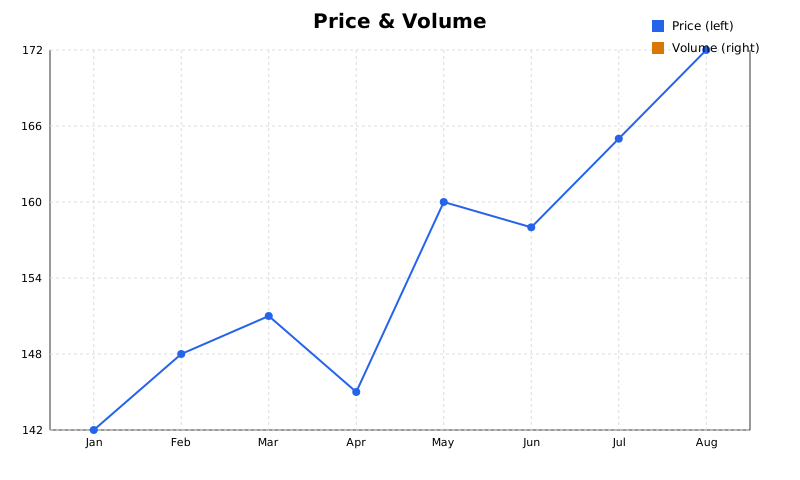
Bind any series to the secondary (right-hand) Y-axis with use_y2=True.
The two axes compute independent domains, so a price line and a volume bar
series can share a chart without either being flattened:
from glyphx import Figure
from glyphx.series import LineSeries, BarSeries

fig = Figure(width=800, height=480)
fig.set_title("Price & Volume")
fig.add(LineSeries(dates, prices, color="#2563eb", label="Price (left)"))
fig.add(BarSeries(dates, volume, color="#d97706", label="Volume (right)"),
        use_y2=True)
fig.set_ylabel("Price ($)").set_y2label("Volume (units)")
fig.show()
Labelling the right-hand axis
set_y2label() mirrors set_ylabel(),
drawing rotated text down the right edge of the plot area. It is a no-op on a
figure with no use_y2 series, so it is safe to set unconditionally when
building charts from a template.
Gridline alignment
Right-hand tick rows are derived from the left axis: each Y1 tick’s fraction
through its domain is read back out of the Y2 domain. The two sets of
gridlines therefore always coincide, including when
set_yticks() gives the left axis a non-default tick
count.
fig.axes.set_yticks([10, 20, 30, 40])   # 4 ticks on the left
# the right axis gets 4 ticks too, on the same pixel rows
Tick formatting
set_tick_format() applies to all three axes – X, Y1 and
Y2:
fig.set_tick_format(lambda v: f"${v:,.0f}")
Note
On a logarithmic Y axis, series that measure from a zero baseline (bar, histogram, box plot, waterfall, stacked and grouped bars) are not zero-anchored, because zero has no position on a log scale. Their domain starts at the smallest positive value instead. Non-positive values are dropped with a warning, as on any log axis.
Heatmap Colour Ranges
cmap accepts any of the named colormaps, the same as every other series
that takes one:
fig.add(HeatmapSeries(matrix, cmap="coolwarm"))
The range is taken from the data unless it is pinned:
fig.add(HeatmapSeries(corr, cmap="coolwarm", center=0))
fig.add(HeatmapSeries(panel_a, cmap="viridis", vmin=0, vmax=100))
Note
center matters for diverging colormaps such as coolwarm and
rdbu, whose whole purpose is a neutral midpoint. Normalising over the
data’s own range puts that midpoint wherever the values happen to
straddle: on a correlation matrix spanning -0.2 to 1.0, zero lands 17% up
the ramp and mildly positive correlations render with the colour that
reads as negative. center=0 widens the narrower side so the neutral
colour marks zero exactly.
vmin and vmax pin the range so two panels are comparable; values
outside it clamp to the ends of the ramp.
Aggregation with Confidence Bands
Repeated measurements – several y values per x, from several subjects,
trials or runs – are collapsed into an estimate per x with a bootstrapped
confidence band, without a manual groupby first:
fig = Figure(title="Recovery score by treatment arm")
fig.aggregate_line(df, x="week", y="score", hue="arm")
fig.set_ylabel("Score (mean, 95% CI)")
fig.show()
estimator accepts "mean" (the default), "median", "sum",
"min", "max", "count", or any callable reducing an array to a
scalar. ci accepts a confidence level, "sd" for one standard
deviation, "se" for standard error, or None for the line alone.
Note
The bootstrap is seeded, so the same data always produces the same band –
a figure in a paper should not shift between renders. Pass seed= to
change it. A group with only one observation gets no interval rather than
a fabricated one, since a single value has no spread to resample.
Each band takes its own line’s colour, so groups stay readable when hue
splits the data.
For the underlying numbers without a chart, glyphx.aggregate.aggregate()
returns (xs, centre, lower, upper) directly.
Math in Labels
Any label – title, axis label, legend entry, annotation – can contain a
$...$ span:
fig.set_ylabel(r"Rate $\frac{dN}{dt}$")
fig.set_xlabel(r"Inverse temperature $\frac{1}{T}$ (K$^{-1}$)")
Around 300 symbols are recognised: all Greek including variants, relations, binary and large operators, arrows, delimiters and miscellaneous signs. Fractions render stacked with a rule over the numerator.
Beyond bare symbols:
Function names –
\sin,\log,\lim,\max,\det,\argand around forty more set upright, since renderingsinin italic makes it read as the product of three variables.Accents –
\hat,\bar,\vec,\tilde,\dot,\ddot,\check,\breve.Alphabets –
\mathbb{R},\mathcal{L},\mathfrak{g}, plus\mathrm,\mathbfand\text.Spacing –
\,,\:,\;,\!,\quad,\qquad.\leftand\rightare accepted and ignored: there is no delimiter sizing, but printing the word “left” into a label would be worse than rendering the bracket at its normal size.
This is a shorthand rather than a full typesetting engine – there are no
matrices or alignment environments – and it needs no LaTeX installation.
Screen readers receive the spoken form, so $\frac{dN}{dt}$ is announced
as dN/dt rather than as markup.
Auto Display
GlyphX detects its runtime environment automatically:
Jupyter notebook — renders inline as an SVG cell output
CLI / script — writes a temporary HTML file and opens it in the default browser
IDE — falls back to the browser viewer
To suppress auto-display (e.g. when building charts to export only):
fig = Figure(auto_display=False)
fig.save("chart.html")   # explicit save, no auto-open
Export and Sharing
fig.save("chart.svg")        # vector SVG
fig.save("chart.html")       # interactive HTML (zoom, pan, tooltips, export buttons)
fig.save("chart.pdf")        # vector PDF  — no extra packages needed
fig.save("chart.png")        # raster PNG  — requires: pip install "glyphx[export]"
fig.save("chart.jpg")        # raster JPG  — requires: pip install "glyphx[export]"
fig.save("chart.pptx")       # PowerPoint  — requires: pip install "glyphx[pptx]"

# Self-contained HTML — zero external dependencies
html = fig.share()                    # returns HTML string
fig.share("report.html")             # also writes to disk
fig.share("report.html", title="Q3") # custom <title> tag
fig.share() inlines all JavaScript into a single file that works in email
clients, Confluence, Notion, GitHub Pages, and offline environments.
PDF is written by a built-in pure-Python writer, so it needs no system libraries and no browser – it works in a bare virtualenv or CI container, which is usually where a camera-ready figure is wanted. The output is true vector: paths stay paths and text stays selectable, so it scales without pixelation and can be searched and copied.
Features with no faithful PDF equivalent here – gradients, clipping paths,
filters – raise glyphx.pdf_writer.UnsupportedSVGError rather than
being dropped, so the file is never quietly missing part of the chart.
pandas Plotting Backend
Existing df.plot() code becomes GlyphX with one line, and no rewrite:
import pandas as pd
pd.options.plotting.backend = "glyphx"

df.plot(x="month", y="revenue")
df.plot.bar(x="month", y=["revenue", "costs"])
df.plot(x="month", y=["revenue", "costs"], subplots=True, sharex=True)
Supports line, bar, area, scatter, hist,
kde/density, box and pie, for both DataFrame and
Series, plus figsize, title, xlabel/ylabel, legend,
grid, logx/logy, colormap, subplots, sharex and
stacked. Column resolution matches matplotlib’s: omit x and the index
is used, omit y and every numeric column is drawn.
Note
Anything unsupported – hexbin, barh, ax=, secondary_y= –
raises NotImplementedError naming what is missing, rather than
silently dropping part of the call and returning a chart that looks
finished.
The return value is a glyphx.Figure rather than a matplotlib
Axes, so .show(), .share() and .save() are available on it.
Log Scale
Pass xscale or yscale to the Figure constructor:
fig = Figure(yscale="log")
fig.add(LineSeries(x, y))
fig.show()
Both axes of a dual-axis chart share the scale setting, so yscale="log"
applies to the secondary axis as well.
Non-positive values are dropped with a warning, since log10 is undefined
at and below zero. Series that measure from a zero baseline – bar, histogram,
box plot, waterfall, and the stacked and grouped bars – are not zero-anchored
on a log axis for the same reason; their domain starts at the smallest
positive value in the data.
fig = Figure(yscale="log")
fig.add(BarSeries(x, y))     # domain starts at min(y), not 0
fig.show()
CLI Tool
Plot any CSV, JSON, or Excel file directly from the terminal:
glyphx plot sales.csv --x month --y revenue --kind bar -o chart.html
glyphx plot data.csv --x date --y revenue --kind line --theme dark --open
glyphx version
Supported input formats: .csv .tsv .json .jsonl .xlsx .xls
Supported output formats: .svg .html .png .jpg .pptx